Google Play Now Requires API 36: What It Means for Your Closed Test (2026)
Since August 31, 2026, new apps and updates must target Android 16 (API level 36) to be submitted to Google Play. If you're uploading your first closed testing build, here's what the rule says, how to fix the target API error, which Android 16 changes to check before your testers see them, and why raising targetSdk won't reset your 14 days.
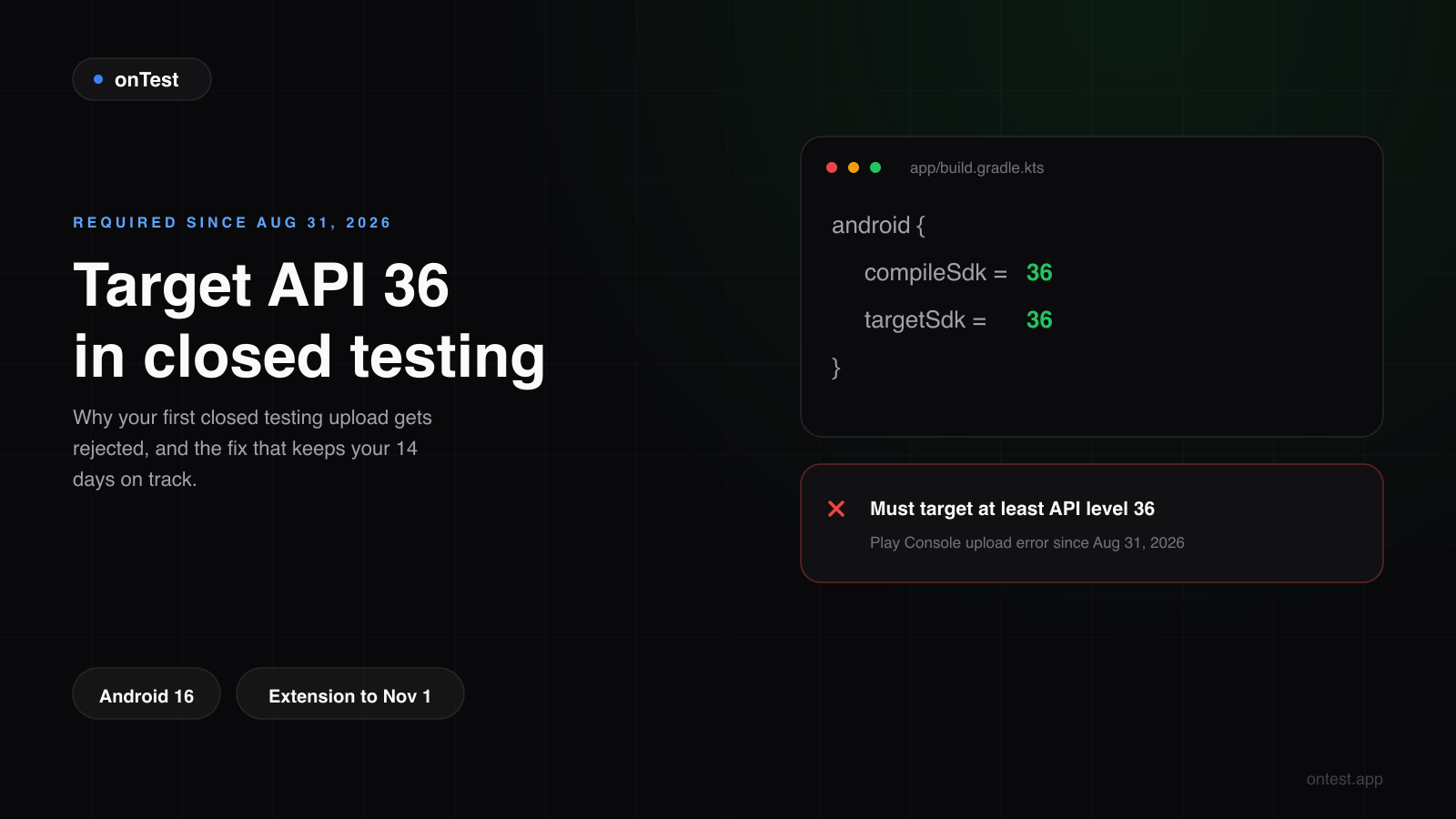
TL;DR: Since August 31, 2026, Google Play requires new apps and app updates to target Android 16 (API level 36) to be submitted. Existing apps must target at least API 35 to stay available to new users on newer devices. If Play Console rejects your closed testing build with a target API error, set targetSdk and compileSdk to 36, rebuild and upload again. Before you do, check the three Android 16 changes most likely to break a typical app: edge-to-edge is now enforced, predictive back replaces onBackPressed, and orientation locks are ignored on tablets and foldables. Raising targetSdk mid-test does not reset your 14 days, because the clock counts opted-in testers, not builds. There is an extension to November 1, 2026, but it's designed for existing apps, so don't plan a new launch around it.
It's an easy trap to fall into this month. A developer finishes the app, opens a brand-new personal account, creates the closed testing track, uploads the bundle, and Play Console stops them before a single tester has opted in.
The message usually reads something like "Your app currently targets API level 35 and must target at least API level 36." Nothing is wrong with the app. The rule changed on August 31, and a lot of project templates, tutorials and framework versions from earlier this year still default to 35.
Here's everything you need to get the build accepted and keep your closed test on schedule.
The Rule Since August 31, 2026
Google's target API level requirements say:
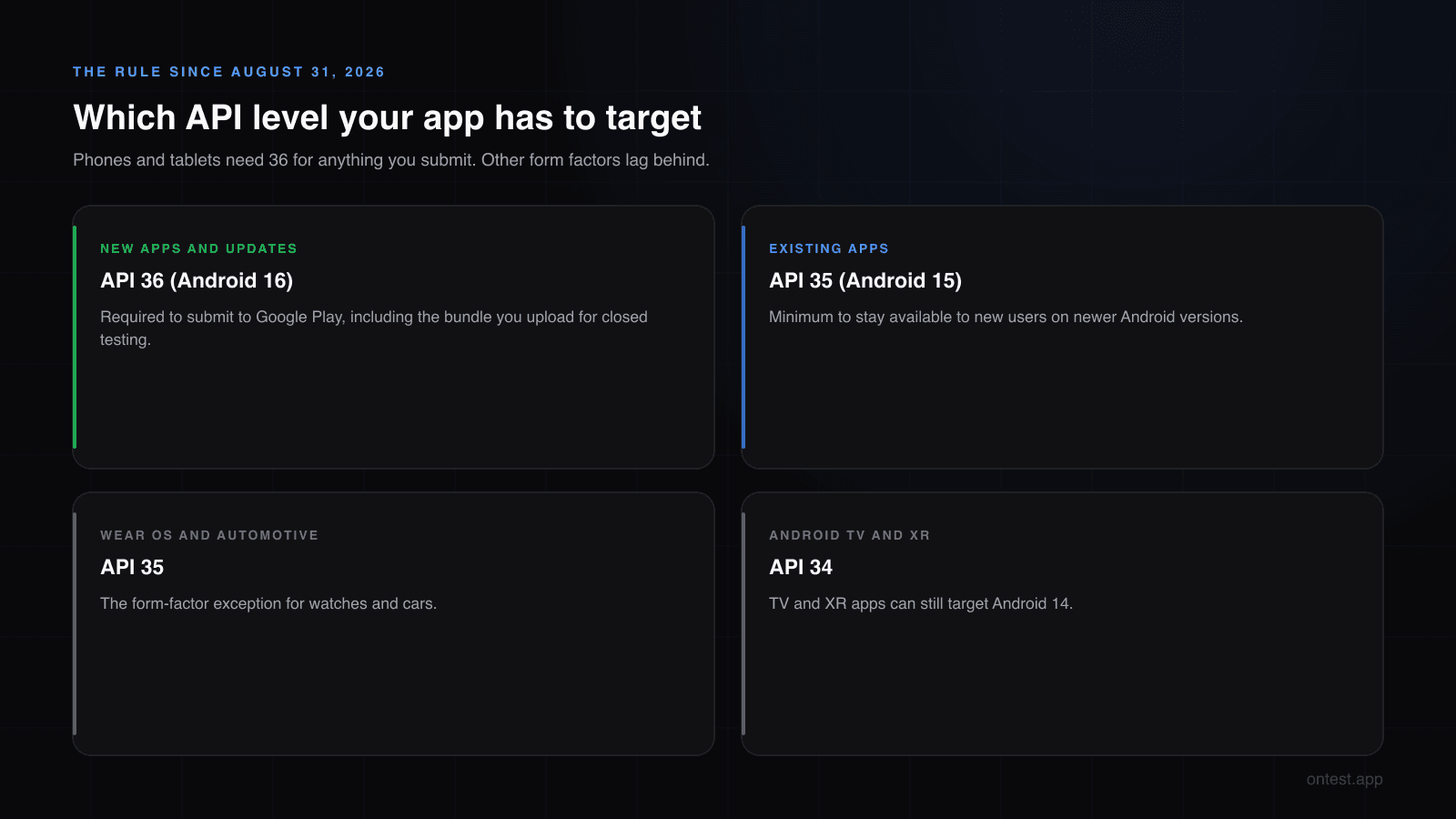
New apps and app updates must target Android 16 (API level 36) or higher to be submitted to Google Play.
And for apps already on the store:
Existing apps must target Android 15 (API level 35) or higher to remain available to new users on devices running Android OS higher than your app's target API level.
There are form-factor exceptions: Wear OS and Android Automotive apps need API 35, and Android TV and Android XR apps need API 34. Everything else, phones and tablets included, needs 36.
Does It Apply to Closed Testing Uploads?
Google's page doesn't mention testing tracks at all. It talks about apps being "submitted to Google Play," and a closed testing release is a submission: it goes through Google's review like any other release. Developers have been reporting the target API error on closed and internal testing uploads since the deadline, so treat it as applying to every track.
The practical rule: build your closed testing bundle with targetSdk 36 from the start. The build your 12 testers install is the same app you'll promote to production, and production definitely requires 36.
Fixing the Error
The change itself is two numbers. In your app module's build file:
android {
    compileSdk = 36

    defaultConfig {
        targetSdk = 36
    }
}
A few things that commonly get in the way:
- An old Android Gradle Plugin. Compiling against API 36 needs a recent AGP. If the build fails after you change the numbers, update AGP and Gradle first (Android Studio's AGP Upgrade Assistant does both).
- Flutter. Many projects use
flutter.targetSdkVersion, which comes from your Flutter version. Either upgrade Flutter to a version that defaults to 36, or settargetSdk = 36explicitly inandroid/app/build.gradle(.kts). - React Native. Set
targetSdkVersionandcompileSdkVersionto 36 inandroid/build.gradle, and check that your React Native version supports them. - Expo. Use the
expo-build-propertiesconfig plugin to set the Android target and compile SDK, or move to an Expo SDK release that defaults to 36. - Libraries. Old dependencies can fail to compile against API 36. Update them before you go hunting for bugs in your own code.
Upload the new bundle to the same closed testing track. Your version code must be higher than the rejected one.
Test These Android 16 Changes Before Your Testers Do
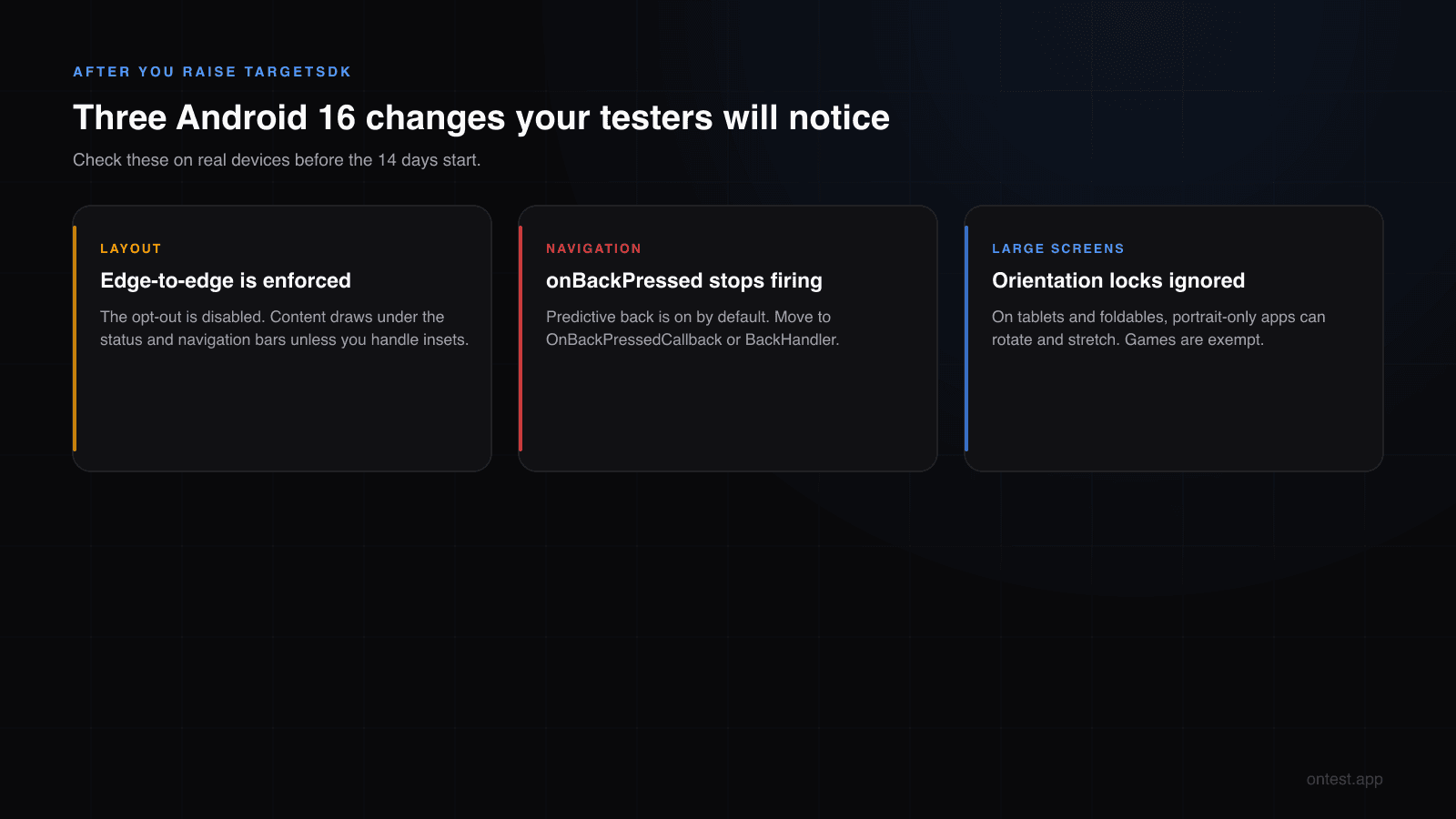
Raising targetSdk turns on new behavior. Most of it won't touch a typical app, but three changes break things visibly, and your 12 testers are exactly the people who'll run into them. From Google's Android 16 behavior changes:
1. Edge-to-edge is enforced. The opt-out attribute (windowOptOutEdgeToEdgeEnforcement) is deprecated and disabled for apps targeting 16. Your content now draws behind the status bar and navigation bar. If you never handled window insets, headers slide under the clock and bottom buttons sit under the gesture bar.
2. Predictive back is on by default. For apps targeting 16, onBackPressed() is not called and KeyEvent.KEYCODE_BACK is not dispatched. If your app intercepts back to close a dialog, confirm an exit or navigate inside a WebView, that code silently stops running. Migrate to OnBackPressedCallback (or the Compose BackHandler). There's a temporary opt-out, android:enableOnBackInvokedCallback="false" on the application, if you need time.
3. Orientation and resizability limits are ignored on large screens. On devices with a smallest width of 600dp or more (tablets, foldables when unfolded), screenOrientation, resizableActivity and aspect ratio limits are ignored. A portrait-locked app can now rotate and stretch. Games are exempt, and there's a temporary per-activity opt-out, but the better fix is a layout that survives rotation.
Other changes worth a look if they apply to you: elegantTextHeight is ignored (check text in Thai, Arabic and several Indic scripts), BODY_SENSORS is replaced by granular health permissions, and scheduleAtFixedRate no longer replays every missed run.
This is where real devices earn their keep. An edge-to-edge bug that looks fine on your Pixel emulator can clip a button on a Samsung with a different navigation bar, and tablet rotation issues only show up on an actual tablet.
Will Raising targetSdk Reset Your 14 Days?
No. The closed testing requirement counts testers, not builds: at least 12 testers opted in continuously for the 14 days before you apply for production. Uploading a new version doesn't touch anyone's opt-in, so your clock keeps running.
In fact, pushing a couple of updates during the test is a good sign for your production application, because it shows the app is being developed in response to testing. The one thing to watch: every update has to be installed by your testers. Avoid shipping one in the last three or four days, when a tester who doesn't update can look inactive.
The November 1, 2026 Extension
Google offers more time: "You will be able to request an extension to November 1, 2026 if you need more time to update your app." The form is on the Policy status page in Play Console, and it's offered to apps that are out of compliance.
It's built for existing apps that need a few extra weeks to migrate an update. Google's page doesn't say whether a brand-new app with no released version can use it, and even if it could, you'd be starting your launch on borrowed time with the same migration still ahead of you. For a new app, just target 36.
Old Builds on Testing Tracks
If you created your testing tracks before August 31, you may still have older bundles sitting on internal or closed testing. Developers report that these can keep showing warnings on the Policy status page even after the new release is fine. Once your API 36 build is live on the closed track, check the other tracks and replace or remove releases you no longer use.
Checklist Before You Upload
compileSdk = 36andtargetSdk = 36in the app module.- AGP, Gradle, your framework (Flutter, React Native, Expo) and libraries updated so the build compiles.
- Version code higher than any bundle you've uploaded before.
- Tested edge-to-edge on at least one device with gesture navigation and one with a button navigation bar.
- Back navigation checked everywhere you used
onBackPressed(). - Rotated the app on a tablet or unfolded foldable.
- Privacy policy link working and Data safety form up to date (both still block releases, see why closed tests get rejected).
- Your Play Console Home page free of developer verification notices.
What Comes Next
Google raises the target API requirement once a year, and the recent pattern has been a late-August deadline for the Android version released that year. Nothing is announced for 2027 yet, but if the pattern holds, expect API 37 to become the requirement for new apps around August 2027. Keeping targetSdk current in every release is a lot cheaper than one big migration against a deadline.
Frequently Asked Questions
Do new apps have to target API 36?
Yes. Since August 31, 2026, new apps and app updates must target Android 16 (API level 36) or higher to be submitted to Google Play. Wear OS and Automotive apps need API 35, and TV and XR apps need API 34.
Does the target API rule apply to closed testing uploads?
Google's page doesn't mention testing tracks, but it applies to apps submitted to Google Play and developers report the error on closed testing uploads. Build your closed testing bundle with targetSdk 36.
Can I get an extension for a new app?
Google offers extensions to November 1, 2026 from the Policy status page in Play Console for apps that are out of compliance. It's designed for existing apps. For a new app, target API 36 instead of relying on it.
What happens to my existing app that targets API 34?
It stays available to users who already installed it, but new users on devices running Android versions newer than your target can't install it. Existing apps need at least API 35 to remain available to new users, and any update you submit must target 36.
Will updating targetSdk restart my 12 testers, 14 days clock?
No. The requirement counts testers who stay opted in for 14 continuous days. Uploading a new build doesn't change opt-ins, so the clock keeps running.
What breaks most often when targeting Android 16?
Edge-to-edge layouts (content under the status and navigation bars), back handling that relied on onBackPressed, and portrait-locked screens that now rotate on tablets and foldables.
When will Google require API 37?
Nothing has been announced. Google raises the requirement yearly, usually with a late-August deadline, so API 37 around August 2027 is a reasonable expectation, not a confirmed date.
Related guides
- Android Developer Verification Is Live covers the other rule that changed this season, and why it doesn't replace closed testing.
- How to Set Up Google Play Closed Testing: Step-by-Step walks through the track your API 36 bundle goes on.
- Google Play Closed Testing Rejected? 5 Reasons Why lists the other policy problems that block releases.
- What Counts as an "Active" Tester? explains why updates late in the test can hurt.
- Google Play's 12 Testers 14 Days Requirement Explained has the exact rule behind the 14-day clock.
Stuck on an upload error that isn't about the target API? Send the exact message to hello@ontest.app and I'll tell you what it means.
Ready to ship your Android app?
Get 12 real testers for Google Play Closed Testing in 14 days.
Get Started