Google Play's 12 Testers, 14 Days Requirement Explained: Who It Applies To and How the Clock Really Works (2026)
Every new personal developer account hits the same wall: 12 testers, 14 consecutive days, before production. Here's exactly what the rule says, who's exempt, why it used to be 20 testers, what 'opted in' really means, and how the 14-day clock behaves when testers drop out.
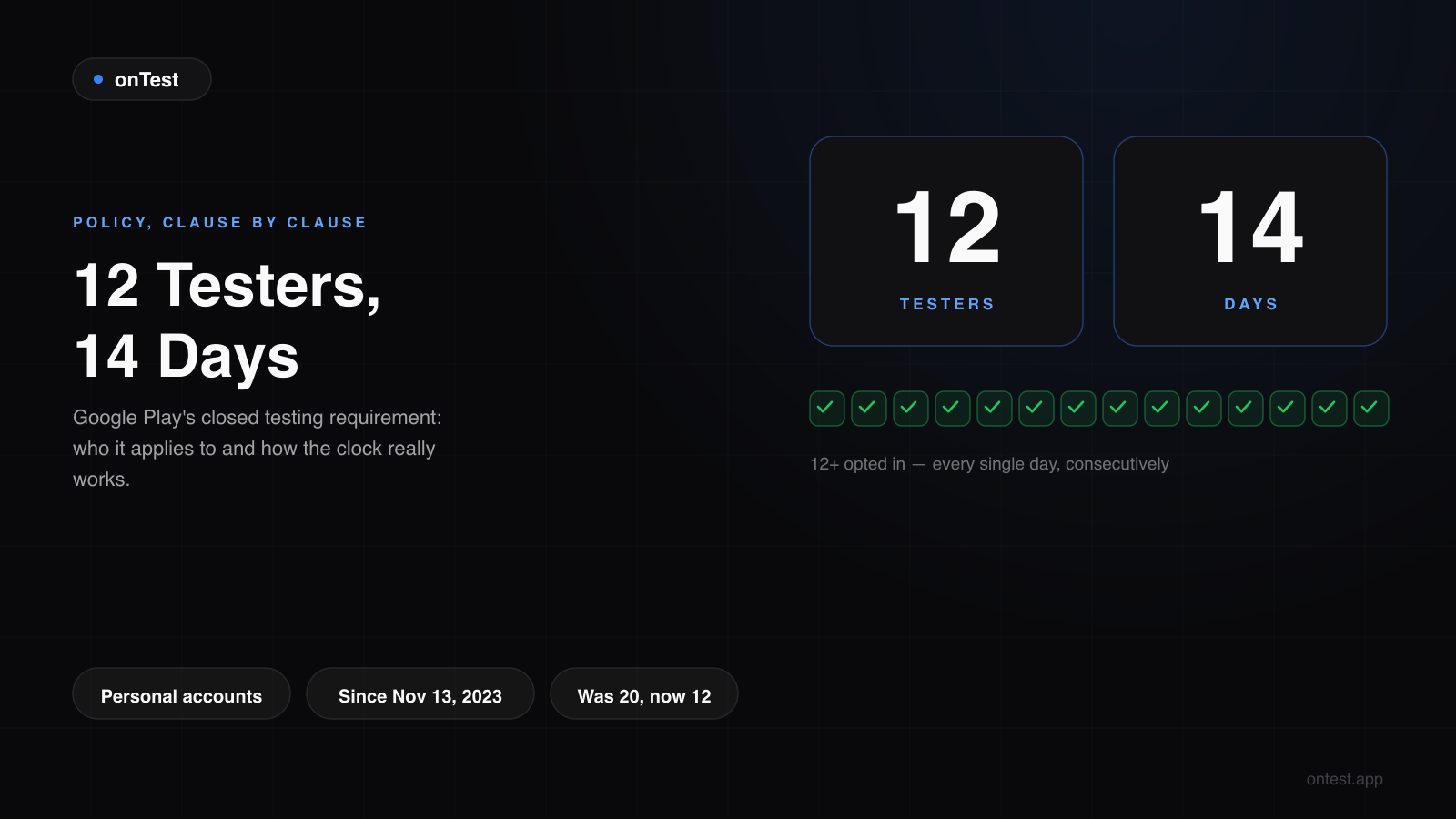
TL;DR: If you created a personal Google Play developer account after November 13, 2023, your app cannot go to production until at least 12 testers stay opted in to a closed testing track for 14 consecutive days. Organization accounts are exempt. The requirement started at 20 testers and was reduced to 12 in 2025. "Opted in" isn't enough on its own — Google also evaluates whether those testers actually used the app. This post explains every clause of the rule, because the details are where launches die.
I've now been on every side of this rule: I shipped two apps through it (losing about three months to it each time), built a service around it, and answered hundreds of emails from developers confused by it. The confusion is almost always about the same five details — details Google's documentation states vaguely or not at all.
Let's go clause by clause.
What the Rule Actually Says
From Google's requirements for new personal developer accounts:
Before applying for production access, you must run a closed test with at least 12 testers who have been opted in for the last 14 days continuously.
Four load-bearing phrases:
- "At least 12 testers" — 12 is the floor, not the target. You can (and should) have more.
- "Opted in" — each tester clicked your opt-in link and joined the test via the Play Store. An email address in your tester list that never clicked doesn't count.
- "Last 14 days" — the 14-day window is measured backwards from now. It's not "14 days total at some point" — it's the most recent 14 days, continuously.
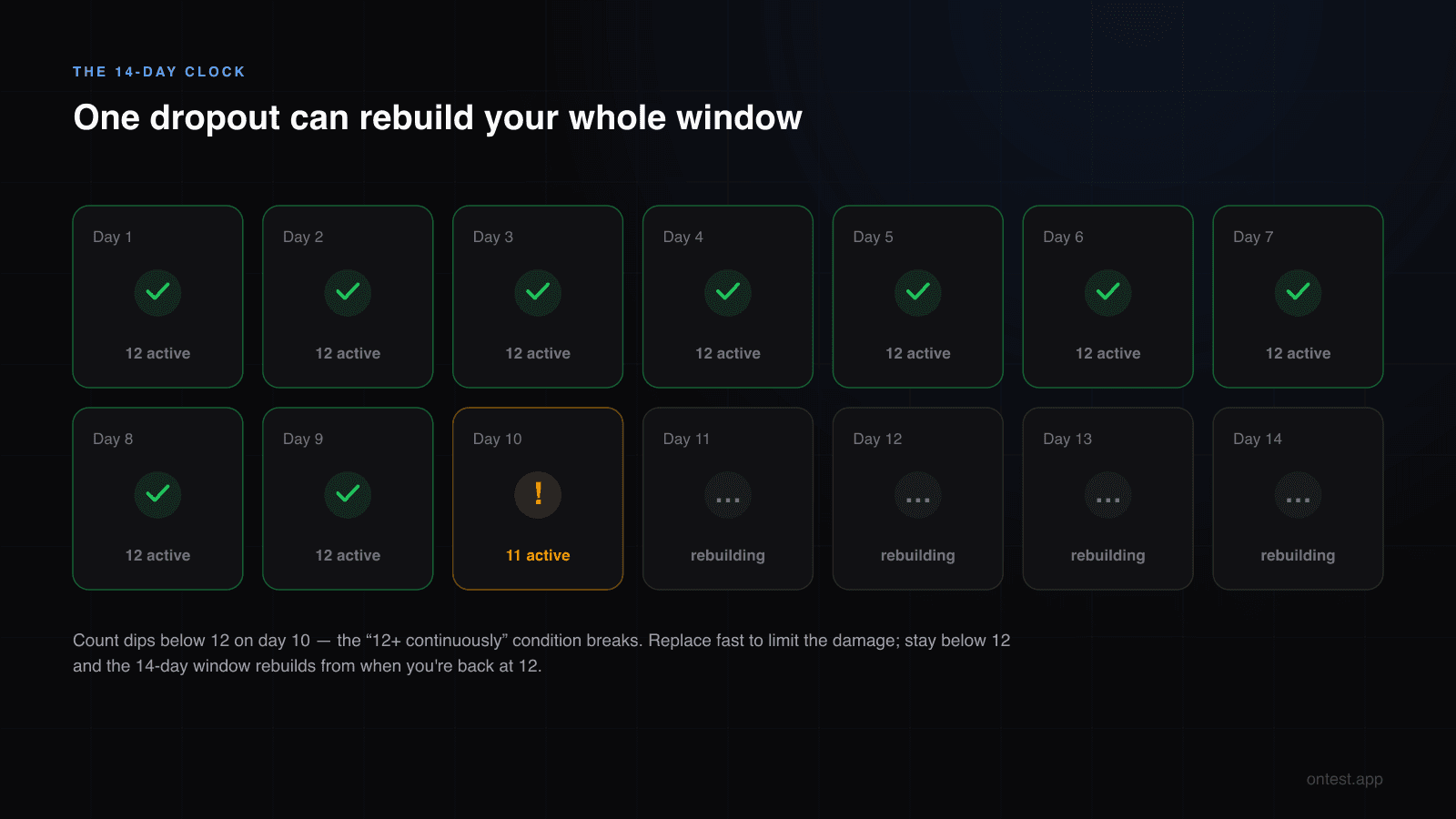
- "Continuously" — if the opted-in count dips below 12, the continuity breaks and the window has to rebuild.
There's also an unwritten fifth requirement that rejections make explicit: engagement. Google's review looks at whether your testers actually used the app during those 14 days. Twelve opted-in testers with zero sessions produce a rejection — the infamous "we need you to continue testing your app with real testers".
Who the Requirement Applies To
It applies to you if:
- Your developer account is a personal account (registered as an individual), and
- It was created on or after November 13, 2023
You're exempt if:
- Your account was created before November 13, 2023 (grandfathered), or
- You have an organization account — registered with a D-U-N-S number as a company
That's the entire matrix. The exemption for organization accounts surprises people: an org account can push an app straight toward production with zero closed testing days. If you have a registered company and a D-U-N-S number, converting is worth considering — though the verification process has its own friction and takes weeks, so it's rarely a shortcut for a launch that's already in progress. I did the full math on the organization route vs just running the test in a separate post.
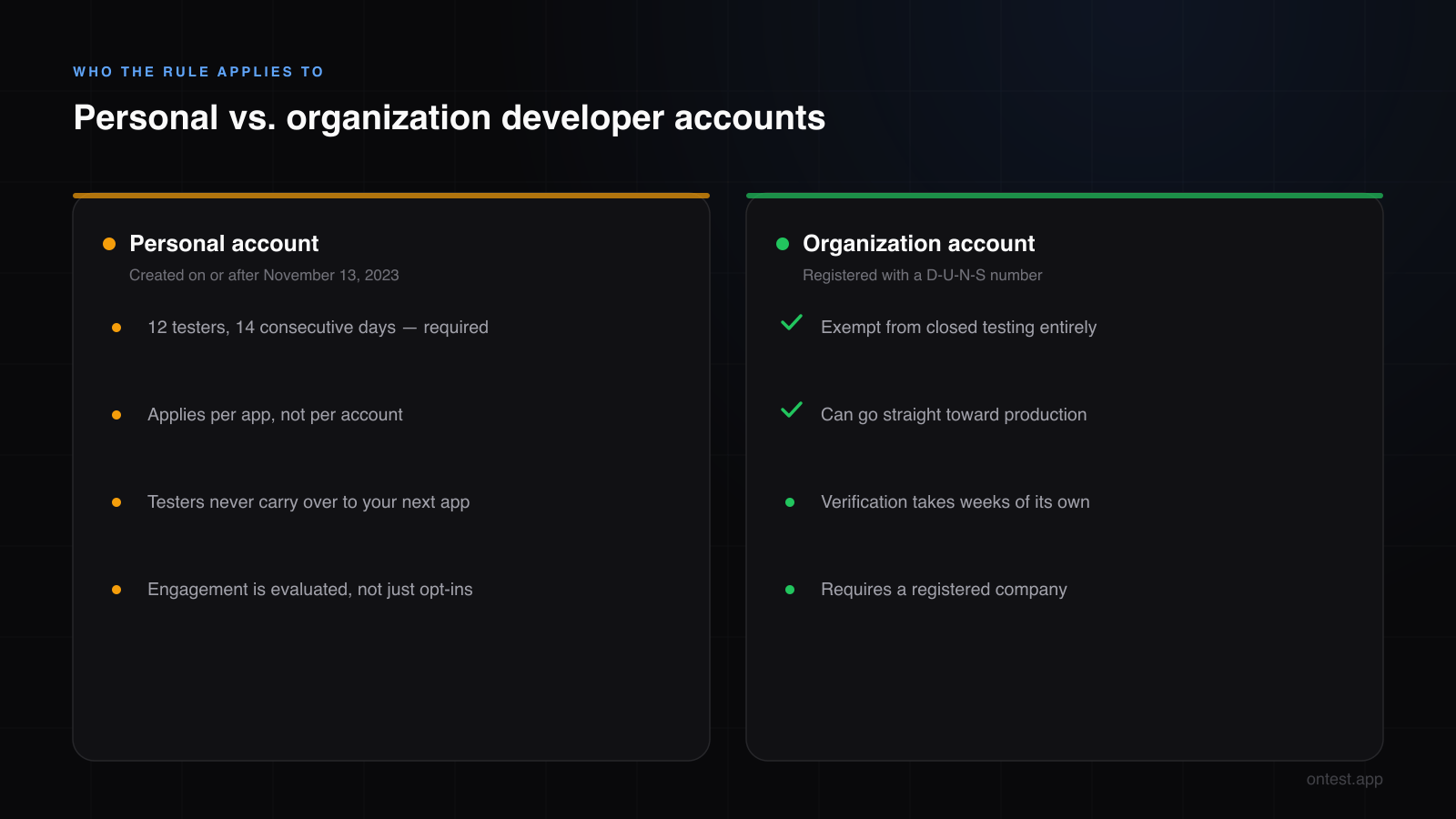
One misconception to kill immediately: the rule is per-account, not per-app. If your personal account is subject to it, every new app you publish needs its own fresh 12-tester, 14-day closed test. Testers don't carry over automatically — I learned that on my second app, when I assumed my Motion Cues testers would count for Let it Rain. They don't. Same people can test again, but they must opt in to the new app's track and the clock starts from zero.
Why It Used to Be 20 Testers (The 20-to-12 Change)
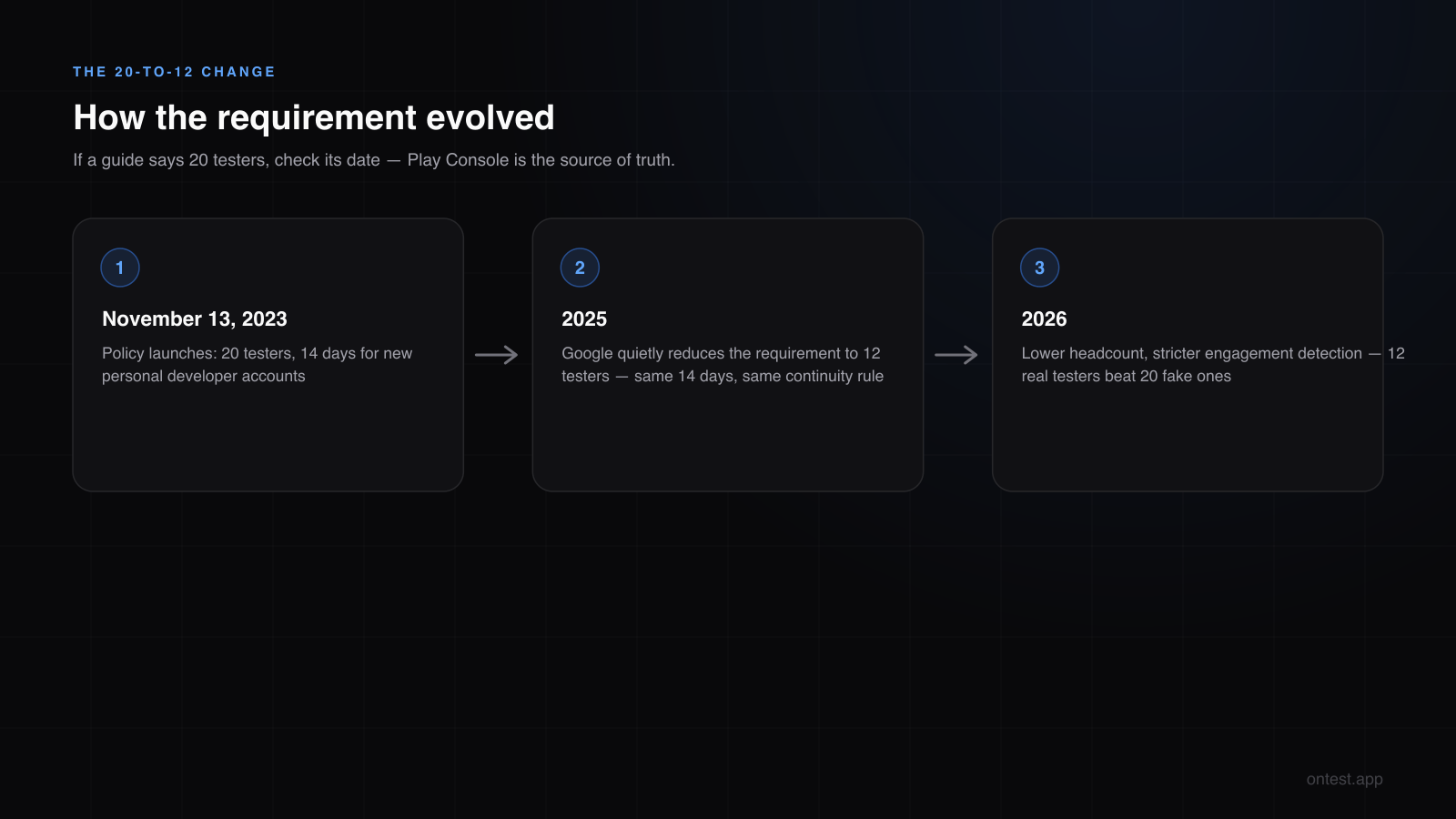
When Google announced the policy on November 13, 2023, the number was 20 testers. That's the number most older blog posts, Reddit threads, and YouTube tutorials cite — and it's why half the advice you find contradicts the other half.
In 2025, Google quietly reduced the requirement to 12 testers. Same 14 days, same continuity rule, lower headcount. The change acknowledged what everyone already knew: 20 genuinely engaged testers was an unrealistic bar for a solo developer whose entire Android-owning social circle is four people.
What this means for you in 2026:
- The current number is 12. If a guide says 20, it's outdated — check its date.
- The engagement expectations didn't get lower. If anything, Google's detection of fake engagement got stricter as the headcount dropped. Twelve real testers beat twenty fake ones every time.
- Play Console is the source of truth. The requirement text in your own Console reflects what applies to your account.
What "Opted In" Actually Means, Step by Step
The opt-in is a specific technical flow, and every step is a place testers get lost:
- You add their email to the tester list in Play Console (or use a Google Group link).
- They receive/click your opt-in link and see the "Become a tester" page.
- They click "Become a tester" — this is the actual opt-in event.
- They install the app from the Play Store using the same Google account.
Common failure points from my own launches: the opt-in email lands in spam; the tester's phone uses a different Google account than the email you added; they click "Become a tester" but never install; they install but their Play Store account switches back to a family account. Each of these produces a tester who thinks they're testing while your Console count stays flat.
Practical rule: the count in Play Console is the only count that matters. Verify it there, not in your WhatsApp replies. (If you haven't created the track yet, the full step-by-step setup walkthrough is here — including the country-selection trap that silently blocks opt-ins.)
How the 14-Day Clock Really Behaves
This is the part Google documents worst, and where I got my day-10 scare — a tester uninstalled at 11 PM and I spent half the night convinced the clock had reset. Here's the actual behavior, from living through it twice and tracking dozens of customer tests since:
The clock starts when the 12th tester opts in. Eleven testers for ten days counts for nothing — the window begins at 12, and adding the 12th tester late effectively restarts your window from that moment.
A single drop-out doesn't instantly zero the clock — but it breaks the "12+ continuously" condition. If your count drops to 11 on day 10, the metrics show a warning. Get a replacement opted in fast and the damage may be limited to extra scrutiny; stay below 12 and your 14-day window rebuilds from when you're back at 12.
Uninstalls and inactivity are different signals. An uninstall drops your opted-in count. An installed-but-never-opened app keeps the count intact but produces the flat engagement line that triggers "insufficient testing engagement" rejections.
Plan for 14-17 days, not 14. Between late opt-ins, drop-offs, and replacement testers, an effective buffer of a few days is normal. The full phase-by-phase timeline shows where the days actually go.
What Happens After the 14 Days
Completing the window doesn't publish your app — it unlocks the "Apply for production access" button. Clicking it opens a questionnaire: roughly 10 questions about how you recruited testers, what feedback you collected, and what you changed. Google's reviewers read your answers against your Console data, so vague answers or answers that contradict your actual engagement metrics get bounced.
Two resources for that stage:
- The production access questionnaire: all 10 questions answered, with templates that passed twice
- After submission, review takes 3-7 business days — here's the full review-time breakdown
The Five Most Common Misconceptions
"12 opt-ins = done." No. Opt-in is the prerequisite; daily engagement across the 14 days is what gets evaluated. This single misunderstanding causes more rejections than everything else combined — opt-in, install, and daily usage are three different levels, broken down here.
"The 14 days can happen anytime." No. It's the last 14 days before you apply — a continuous, current window. A great test in March doesn't help an application in June if testers have since dropped.
"Emulators / secondary profiles count." They register as installs, but Play Integrity attestation and behavioral signals flag them. Google's detection in 2026 catches emulator farms reliably — here's how it distinguishes real devices from fake ones.
"My testers from the last app carry over." The people can, the opt-ins can't. Every new app runs its own clock.
"Paid testers are against the rules." Google's own questionnaire lists paid testing services as a legitimate recruitment channel. What matters is that the testers are real and engaged — all seven recruitment methods, compared honestly, are here.
Meeting the Requirement Without Losing Months
The requirement itself is fixed — 12 testers, 14 days, no way around it for a personal account. The variable is how long you spend on recruitment. My first app took 6 weeks to find 12 stable testers; developers with an existing audience do it in days; a testing service does it in hours.
Whatever route you take:
- Recruit 15-18, not 12 — buffers absorb drop-offs.
- Start recruiting before the code is finished — the phases run in parallel.
- Watch Console engagement from day 1 — replace flat-liners immediately, not on day 13.
- Keep notes during the 14 days — the questionnaire will ask, and specific answers pass.
If you'd rather solve recruitment in an afternoon: onTest provides 12 real testers on premium Android 14+ devices (Galaxy S24, Pixel 8, Xiaomi Mi 14, Nothing Phone 2, OnePlus 12 and more) who opt in within hours and use your app daily for the full 14 days plus 1 bonus day, with daily screenshots as proof. One flat package: 12 testers, 15 days, $19.99. The full comparison against other testing services is here.
Frequently Asked Questions
Is the Google Play requirement 12 or 20 testers in 2026?
- The policy launched in November 2023 requiring 20 testers, and Google reduced it to 12 in 2025. Any guide citing 20 testers is outdated. Your own Play Console shows the requirement that applies to your account.
Does the 12 testers rule apply to organization accounts?
No. Organization developer accounts (registered with a D-U-N-S number) are exempt from the closed testing requirement entirely. It applies only to personal accounts created on or after November 13, 2023.
Do all 12 testers need to use the app every day for 14 days?
Google doesn't publish an exact threshold, but rejected tests consistently share one trait: testers who opted in and rarely or never opened the app. Regular daily opens across the window are the safe baseline. Opted-in-but-idle testers are the most common cause of "more testing required."
What happens if my tester count drops below 12 during the 14 days?
The continuity condition breaks. A brief dip with a fast replacement may only add scrutiny and a few effective days; a sustained drop means your 14-day window rebuilds from when the count returns to 12+. Recruit 15-18 testers so a dropout never takes you below the floor.
When does the 14-day clock start?
When your 12th tester opts in. Time spent with 11 or fewer opted-in testers doesn't count toward the window.
Can the same 12 testers test my second app?
The same people can, but they must opt in to the new app's closed testing track, and the 14-day clock starts from zero. Opt-ins and testing time never transfer between apps.
Can I just wait out the requirement or skip closed testing?
No. For personal accounts under the policy, production access is locked until a 14-day, 12-tester closed test completes and Google approves your production access application. The alternatives are converting to an organization account (weeks of verification, requires a company) or completing the test.
How do I check my progress toward the 14 days?
Play Console shows your closed testing requirements status on the app dashboard, including the opted-in tester count and days progress. Check it daily during your test — it's the source of truth, not your testers' promises.
Is it against Google's rules to pay for testers?
No. Google's production access questionnaire explicitly includes paid testing services as a recruitment channel. The requirement is that testers are real people on real devices genuinely using the app — not how you found them. Disclose the channel honestly in the questionnaire.
Related guides
- Android Developer Verification Is Live: The identity check that started September 30, 2026, and why it does not replace this rule.
- How to Get 12 Testers: 7 Methods Compared — Every recruitment channel with honest costs, speeds, and risks.
- How to Set Up Google Play Closed Testing: Step-by-Step — The Play Console walkthrough that satisfies this rule.
- What Counts as an "Active" Tester? — Opt-in vs install vs daily usage, level by level.
- Personal vs Organization Google Play Account — The exemption matrix in depth, with the D-U-N-S math.
- Free Testers vs Paid Testers — What the free routes really cost in hours.
- How Long Does Google Play Closed Testing Actually Take? — The real timeline around the 14 days.
- Closed Testing Rejected? 5 Reasons Why — When 12 testers and 14 days still weren't enough.
- Production Access Questionnaire: 10 Questions Answered — The exam that follows the 14 days.
- Why Real Human Testers on Real Devices Matter — What Google's algorithm actually measures.
Confused about whether the rule applies to your account? Email hello@ontest.app with a screenshot of your Console dashboard — I'll tell you exactly where you stand.
Ready to ship your Android app?
Get 12 real testers for Google Play Closed Testing in 14 days.
Get Started