Google Play Production Access Questionnaire: 10 Questions Answered After 12 Testers, 14 Days (2026 Templates)
After your 12 testers complete the 14 days, Google asks 10 questions. Real copy-paste answers from two apps that got approved — plus why generic responses trigger 'more testing required'.
After 12 testers completed 14 days of closed testing for my friend's app Motion Cues, he clicked "Apply for production access" — and froze.
The screen wasn't asking for one form. It was three sections, ten questions, and a "submit" button at the end that decides whether two weeks of 12 testers grinding through your app were worth anything.
He sent me a screenshot at midnight: "What do I even write here?"
We wrote answers together, submitted, waited four days. Approved. A few weeks later we did it again for Let it Rain — approved on the first try. Same template, different app.
This post is that template. Every question, what Google is actually asking, the answer that worked, and what gets you rejected. If you're staring at this form right now, you'll find your own words by the end.
Why This Form Is Harder Than It Looks
Here's what trips most developers up: the questionnaire isn't a formality. Google reviews it manually. Reviewers see thousands of submissions per week, and they can spot a copy-paste template from across the room.
You can have all 12 testers active for the full 14 days and still get rejected here. The 12 testers and 14 days are the prerequisite — the questionnaire is the exam. The most common rejection reason in 2026 isn't "not enough testers" — it's "insufficient testing engagement" (one of the 5 real rejection reasons I've broken down separately), which is partly about your 12 testers' behavior during the 14 days and partly about your answers. If you write "the app worked fine, no issues found" for every question, Google reads that as "this developer didn't actually test anything during the 14-day window."
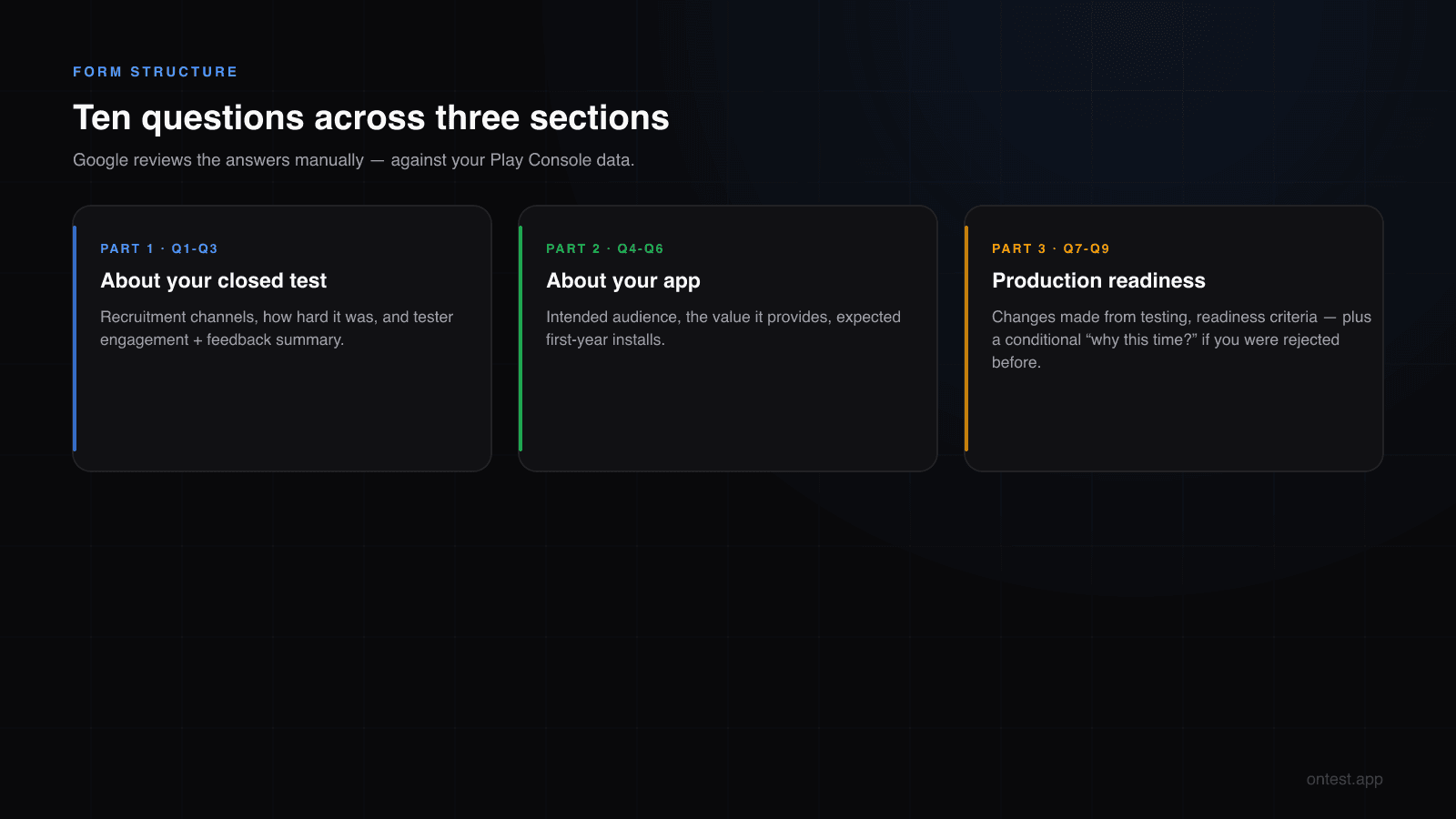
The form has three parts:
- About your closed test — 3 questions about recruitment and feedback
- About your app/game — 3 questions about audience and value
- Production readiness — 2 questions about what you changed and why you're ready
Plus a conditional question if you've been asked to continue testing before. So technically 9-10 depending on your history.
Let's go through each.
Part 1: About Your Closed Test
Q1 — How did you recruit testers for your closed test?
What Google is asking: They want to confirm you used real channels. They're not judging the channel — paid service, friends, Reddit, all fine (here's every recruitment channel compared, if you're still at that stage). They're checking whether your answer is specific and plausible.
What gets rejected:
"I asked some people to test it."
Too vague. Reads like you didn't really do it.
Template that worked (Motion Cues):
I recruited testers through a combination of three sources. First, I reached out to my personal network — five friends and three family members who use Android devices. Second, I posted in the r/androiddev tester-swap thread on Reddit and exchanged with four other indie developers who were also running closed tests. Third, I added a small buffer of two testers from a paid testing service to absorb potential drop-offs. In total, 14 testers opted in across the 14-day window, with 12 testers remaining actively engaged through day 14.
Why this works: It names specific channels, gives specific numbers, and shows you planned for drop-offs. Three signals of competence in one paragraph.
If you used onTest or another testing service, write it directly:
I used onTest (ontest.app), a paid closed testing service that provides verified Android testers on real devices. They assigned 12 testers within hours of my order, and all 12 testers remained opted-in and active throughout the 14 days. I also added two testers from my personal network as an additional buffer.
Don't hide that you used a service. Google knows services exist — they only care that the testing actually happened. Honesty here helps.
Q2 — How easy was it to recruit testers?
What Google is asking: Pure data collection — they're studying how the policy is landing for new developers. This answer doesn't gate your approval, but a thoughtless response (one word, sarcastic remark) leaves a bad impression on the reviewer reading everything together.
Template:
Recruiting 12 testers was moderately difficult. Most of my personal network uses iPhone, which limited my options immediately. The Reddit tester-swap community helped, but coordinating across time zones and managing drop-offs added significant overhead — I had to recruit 14 to net 12 active testers across the 14 days. Without a paid service to fill the gap, I estimate the recruitment phase alone would have taken three to four weeks before the 14-day clock could even start.
Honest, specific, three sentences. Done.
Q3 — Describe tester engagement and summarize feedback
This is the biggest question. Google's actual prompt asks two things:
- Whether your 12 testers used all features and behaved like real users during the 14 days
- A summary of the feedback you collected
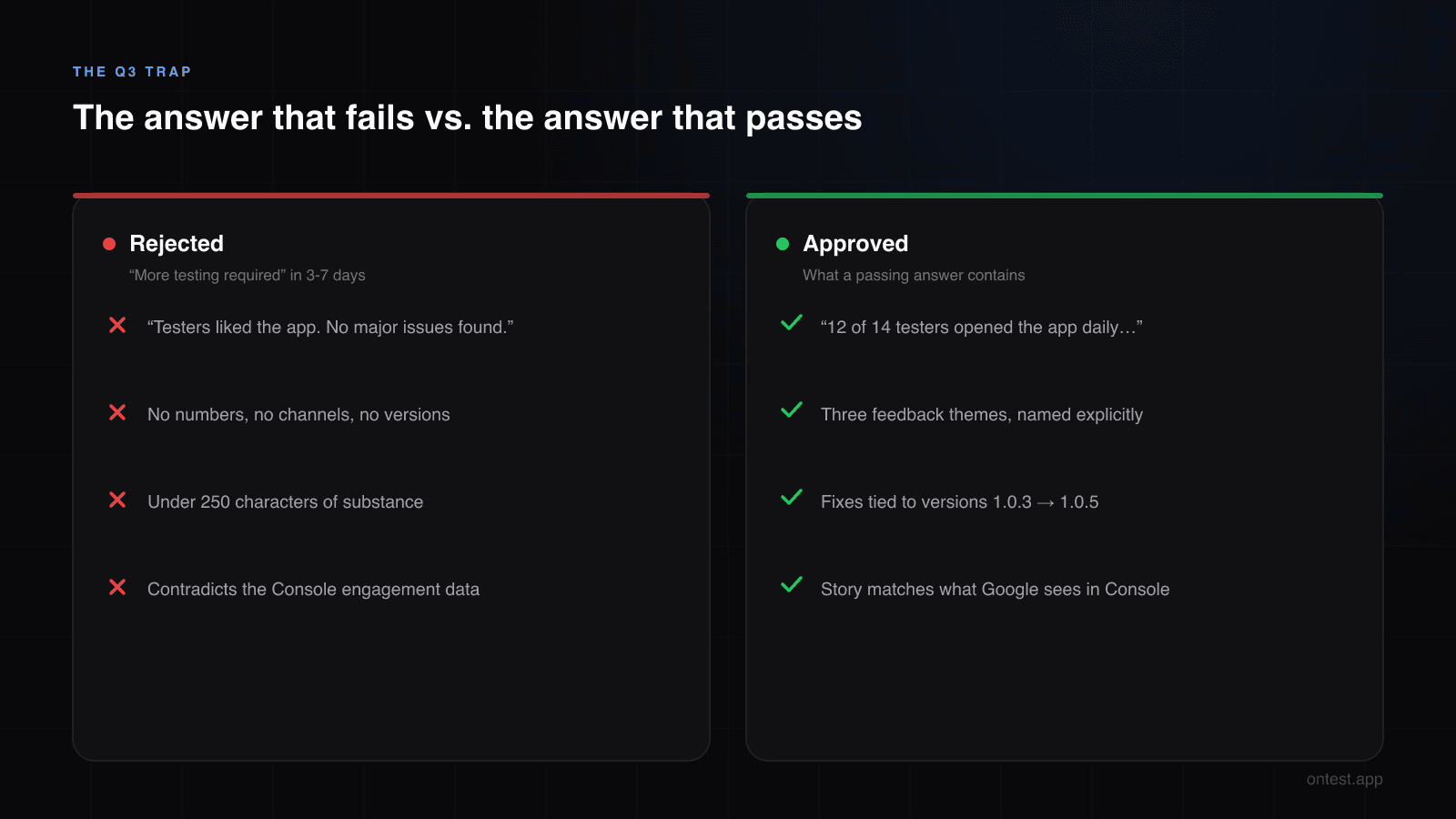
What gets rejected:
"Testers liked the app. No major issues found."
This is the single most common rejection trigger. It tells Google that either (a) you didn't actually collect feedback from your 12 testers across the 14 days, or (b) you don't take this question seriously. Either way: "more testing required."
Template that worked (Motion Cues):
Engagement across the 14-day window was consistent with how I'd expect real users to behave. 12 of 14 testers opened the app at least once daily across the full 14 days, with an average session length of around 90 seconds — appropriate for a motion-sickness tool that's used in short bursts during travel. The 12 active testers exercised all three core features (intensity adjustment, color scheme toggle, and background mode).
Feedback was collected through three channels: an in-app feedback button linked to a Google Form, direct WhatsApp messages from personal-network testers, and Play Console testing feedback for users who submitted privately.
Key feedback themes:
- Battery drain in background mode — three testers reported the app consuming noticeable battery when left running. I profiled the issue and reduced wake-lock frequency in version 1.0.3.
- Color contrast in bright environments — two testers found the default visual cues hard to see in direct sunlight. I added a high-contrast mode in version 1.0.4.
- First-launch confusion — four testers were unsure what to do on the first screen. I added a 3-step onboarding flow in version 1.0.5.
All three issues were addressed during the testing window and pushed as updates to the closed track.
Why this works: Specific engagement metrics (12/14, ~90 seconds, daily), three feedback channels, three specific issues with version numbers showing you actually shipped fixes. This is what "showing your work" looks like.
Quick rule: Aim for at least 250 characters in this answer. Community data suggests 250-300 character minimums per text field reduce rejection rates noticeably. Don't pad with filler — give real detail.
Part 2: About Your App/Game
Q4 — Who is your intended audience?
What Google is asking: They want to confirm your app serves a coherent group. "Everyone" is the wrong answer.
Template:
Motion Cues is built for people who experience motion sickness during travel — particularly passengers in cars, buses, and boats. The primary audience is adults aged 25-55 who travel frequently for work or family reasons and have moderate-to-severe motion sickness symptoms. Secondary audiences include parents of children prone to car sickness and travelers managing post-concussion symptoms. The app is not directed at children under 13 and does not collect data that would qualify under COPPA.
Specific demographic, specific use case, and a quick policy-compliance signal at the end (the COPPA line). The last sentence is a small trust marker that costs nothing.
Q5 — How does your app provide value? (or: What makes your game stand out?)
What Google is asking: A short product pitch. They're checking whether the app has a real reason to exist on the Play Store.
Template:
Motion Cues uses visual horizon cues displayed on the phone screen to reduce motion sickness symptoms in passengers. The approach is based on published research showing that providing a stable visual reference during vehicle motion can reduce nausea and discomfort. Unlike medication-based solutions, the app is non-invasive, has no side effects, and works on demand. The free version covers core functionality; a one-time paid upgrade adds custom color schemes and background mode. This provides immediate value to a clearly defined user need without requiring subscriptions or personal data.
Three boxes ticked: what it does, why it's different, business model. Reviewers scan for this trio.
For games, focus on what makes the mechanic, art, or progression distinct from similar titles.
Q6 — Expected first-year installs
Multiple choice — be honest and conservative. Don't overestimate. If you say 1M+ installs as a brand-new developer, you're either bluffing or planning incentivized installs (a policy violation). If you say fewer than 1,000, you signal a thoughtful expectation.
For most indie apps: 1,000 – 50,000 is the sane range. Pick what genuinely matches your marketing plan.
Part 3: Production Readiness
Q7 — What changes did you make based on closed testing?
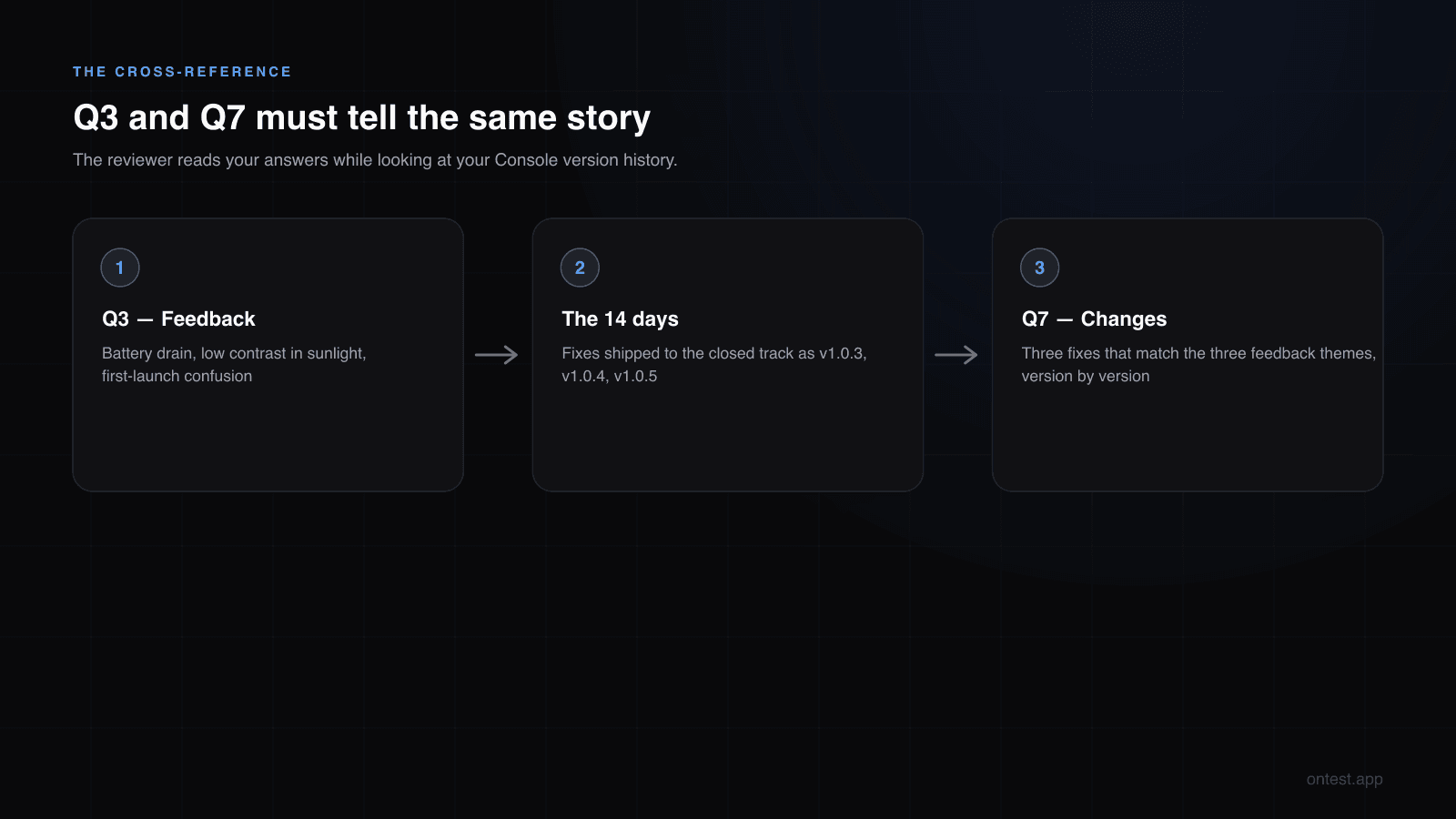
This is the question that retroactively justifies all of Part 1. If you said you got feedback in Q3, Google now wants to see the changes.
Template (matches the Q3 feedback exactly):
Three substantive changes were made during the closed testing window based on tester feedback:
Version 1.0.3 — Reduced background battery consumption. Profiled wake-lock usage and replaced the always-on timer with an event-driven listener. Battery drain dropped from approximately 8% per hour to under 2% per hour in background mode.
Version 1.0.4 — Added a high-contrast color mode for use in bright environments. The new mode increases visual cue contrast by 40% and is toggleable from the main settings screen.
Version 1.0.5 — Introduced a three-step onboarding flow on first launch. The flow explains the app's purpose, demonstrates the intensity slider, and prompts the user to allow notifications for travel reminders.
Each release was uploaded to the closed testing track and validated by at least three of the 12 testers before the next update — ensuring real engagement signals across the full 14 days, not just at the start.
The cardinal rule: Q7's content must reconcile with Q3's content. If Q3 mentioned three issues, Q7 should describe three fixes. If they don't match, the reviewer notices instantly.
If you genuinely got no actionable feedback: Don't fake it. Write:
Testers did not surface any critical bugs during the closed test. However, based on observed engagement patterns and informal feedback, I made two refinements: I reduced the first-launch text by approximately 30% to improve clarity, and I adjusted the default font size after noticing two testers had to zoom in repeatedly. No functional changes were required.
Honest, specific, and shows you were paying attention even when no one explicitly complained.
Q8 — How did you decide the app was ready for production?
What Google is asking: A short readiness checklist. This is your closing argument.
Template:
I considered the app production-ready when the following conditions were met:
- All tester-reported issues had been addressed and verified in the closed testing track.
- The app ran for 14 consecutive days without crashes on the devices represented in the closed test (Android 9 through Android 14, six manufacturers).
- The pre-launch report in Play Console returned no critical issues.
- The store listing, content rating, privacy policy, and data safety form were complete and reviewed.
- Crash-free user rate during closed testing was above 99.5% based on Android Vitals.
At that point I felt confident the app would deliver a stable experience to general users.
Five concrete criteria. Reviewers love this format because it reads like a competent engineer signed off.
Q9 (Conditional) — Why are you ready this time?
Only appears if you've been rejected before with "more testing required." Do not freelance an answer that contradicts your earlier submission.
Template:
Following the previous review, I extended testing for an additional 10 days with the same 12 testers, with a specific focus on the engagement gaps Google identified. Tester open rates during this period averaged 1.4 sessions per day per tester (up from 0.6 in the previous round). I also pushed two additional updates — version 1.1.0 addressing a navigation bug surfaced in the extended testing, and version 1.1.1 improving first-launch retention. The closed test now reflects sustained, distributed engagement across all 12 testers.
Acknowledge what was wrong, show what you fixed, give numbers.
The Five Mistakes That Trigger Rejection After 12 Testers and 14 Days
After helping a few other indie devs through this form, here's the pattern of what gets sent back:
1. Vague answers under 250 characters. Each text field needs substance. Aim for 300+ characters where you have something real to say about your 12 testers and the 14 days.
2. Contradictions between sections. Q3 says "lots of feedback, three bug reports," Q7 says "no changes needed." Reviewer reads both. You're done.
3. Generic templates that obviously weren't written about your app. Don't paste a template verbatim — including this one. Use the structure, fill in your real details from your actual 14-day run.
4. No version updates during the 14 days. Q7 expects updates. If you uploaded v1.0.0 on day 1 and never touched it across the 14 days, Google reads "no real testing happened." Push at least 2-3 minor updates during the 14-day window — even tiny fixes count.
5. Claiming installs you can't justify. If you say "100,000-500,000 first year" with no marketing, no audience, no app store history, you look like a spammer. Pick a number that matches your actual plan.
How Long After Submission?
For my friend's two apps:
- Motion Cues — submitted Wednesday at 10:00, approved Monday at 14:30. ~4 business days.
- Let it Rain — submitted Thursday at 18:00, approved the following Wednesday at 11:00. ~6 business days.
Google states the review "usually takes 7 days or less, but may occasionally take longer." Worst-case stories in r/androiddev mention 2-3 weeks during peak periods. Plan accordingly — I tracked what actually affects the review time in 2026, including why the day of the week you submit matters.
If you go beyond 10 business days with no response, you can contact Play Console support — but don't email earlier than that. Pinging early doesn't speed anything up and can reset the queue.
The Real Lesson
Here's what I wish someone had told my friend on day 14: the questionnaire is the test for whether you actually used closed testing. The 14-day timer is the prerequisite. The form is the exam.
Two reviewer mindsets, two outcomes:
| If your answers show... | Reviewer thinks... | Outcome |
|---|---|---|
| Specific channels, real numbers from all 12 testers across 14 days, version updates, matched feedback-and-fixes | "This developer ran a real test." | Approved in 3-7 days |
| Generic phrases, no numbers, no version updates, "no issues found" after 14 days | "This developer rushed through the 14-day closed testing." | "More testing required" — 14 more days |
You don't get points for elegance. You get points for evidence. Numbers, version names, dates, specific bugs, specific fixes. The more concrete you are, the faster you get out.
If You're About to Submit Right Now
A 10-minute checklist:
- Open Play Console → Android Vitals → confirm your crash-free rate
- Open Testing feedback → screenshot or copy what testers said
- Note your version history (1.0.0 → 1.0.1 → 1.0.2 etc.) and what changed in each
- Count installs in the closed test (Play Console shows this)
- Write each answer in a separate doc first, paste into the form last
- Re-read Q3 and Q7 side-by-side — they must tell the same story
- Hit submit, close the tab, do something else for a week
Good luck. If you've made it this far, you're closer than most.
Want to Skip the Hard Part?
The questionnaire becomes much easier when you've actually had 12 engaged testers for the full 14 days. That's the part onTest handles: 12 real Android testers on real devices, 14 days of daily activity tracked, installation proof timestamped. By day 15 you have everything Q3 and Q7 need — real engagement data from 12 testers across 14 days, real feedback, real evidence.
12 testers, 15 days (the 14 Google requires plus 1 bonus day), $19.99 flat.
Frequently Asked Questions
Do I need exactly 12 testers for the full 14 days to pass the production access form?
Yes. Google requires a minimum of 12 testers opted-in continuously for the last 14 days before you can submit. If your count drops below 12 at any point in the final 14 days, the clock can effectively reset. The questionnaire then evaluates how engaged those 12 testers were across the 14 days.
What happens after the 12 testers complete the 14 days?
A new "Apply for production" option appears on your Play Console dashboard. Clicking it opens the questionnaire covered in this guide — 9-10 questions across three sections. Google's review typically takes 3-7 business days after submission.
How many questions are on the Google Play production access form?
There are 9 questions across three sections (closed test, app details, production readiness), plus one conditional question that appears only if you've been previously asked to continue testing. Most developers face 8-9 questions in total.
How long does Google take to review production access after submission?
Google states "7 days or less" for most submissions. In practice, 3-7 business days is typical. During high-traffic periods (often January and post-holiday weeks), reviews can stretch to 10-14 days.
What is the most common reason for rejection?
"Insufficient testing engagement" — usually triggered by a combination of low tester activity during the 14 days and vague answers on the questionnaire. The two are evaluated together.
Can I edit my answers after submitting?
No. Once submitted, the form is locked until Google responds. If rejected, you'll resubmit with new answers — often after additional testing days.
Do I need to push app updates during the 14-day testing window?
Strongly recommended. Pushing 2-3 minor updates during testing signals to Google that you're actively responding to feedback. Apps submitted with zero updates during testing face higher rejection rates.
Should I be honest if I used a paid testing service?
Yes. Paid services are explicitly allowed by Google. Hiding it and getting caught is worse than disclosing it. Reviewers care that real testing happened, not which channel you used to find testers.
What's the minimum length for the text answers?
There's no published minimum, but answers under ~250 characters are commonly flagged as "vague." Aim for 250-400 characters per text field — enough to be specific without padding.
Will my answers be visible publicly on Google Play?
No. Per Google's documentation, "your answers are not shown on Google Play, and won't affect the features and services you can access in Play Console." They're only seen by the review team.
Related guides
- Closed Testing Rejected? 5 Reasons Why and What to Do Next — If your submission comes back with "more testing required," start here.
- Google Play Closed Testing Review Time in 2026 — What happens after you hit submit, with real dates.
- Google Play's 12 Testers 14 Days Requirement Explained — The rule this questionnaire is the exam for.
- How to Get 12 Testers: 7 Methods Compared — For your next app, or if you need replacement testers.
- How Long Does Google Play Closed Testing Actually Take? (2026 Real Timeline) — The full timeline from setup to production approval, including the phases the "14 days" promise hides.
- My Friend's Two Android Apps, Three Months Lost, and Why We Built onTest — The founder story behind onTest.
If you're filling this form out right now and stuck on a specific question, email me at hello@ontest.app — I'll reply within the day.
Ready to ship your Android app?
Get 12 real testers for Google Play Closed Testing in 14 days.
Get Started