How Long Does Google Play Closed Testing Actually Take? (2026 Real Timeline)
Google says '14 days' — but once your code is done, how long is it really? The actual timeline from a friend's two Android apps and what we learned about every phase.
A message from my friend came in at 11 PM: "Bro, one of the testers uninstalled the app. Did the counter reset?"
It was Monday night. Motion Cues was on day 10 of its 14-day closed testing. One tester had removed it.
I spent 30 minutes digging through Google's documentation, scrolling subreddits, refreshing Play Console. No clear answer anywhere. Next morning we checked the Console — counter wasn't reset, but the metrics had a "warning" icon.
Four days later, Google said "production access granted." I still don't fully understand how it works.
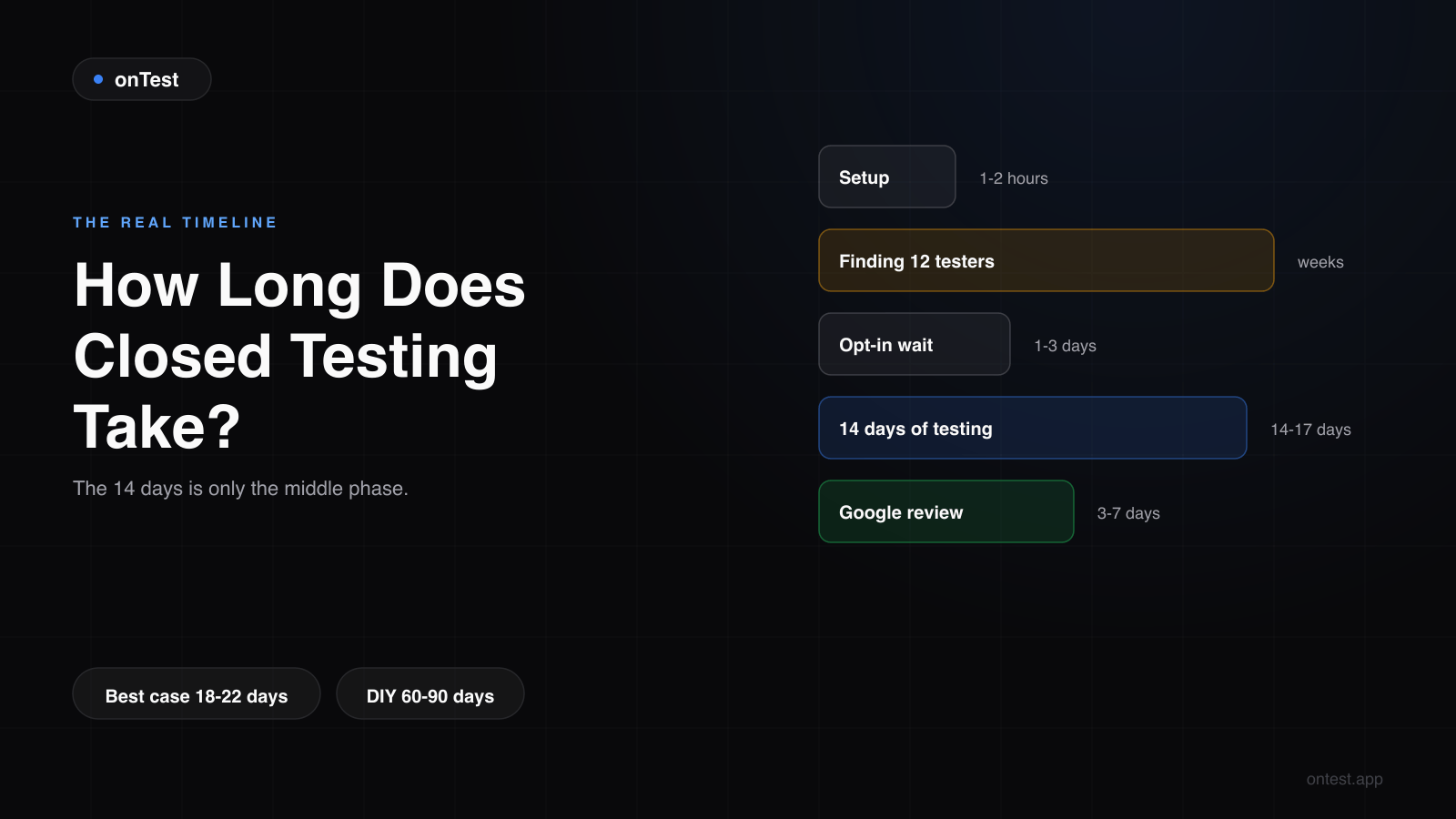
That's the real story of Google Play closed testing: the "14 days" everyone talks about is just the middle slice of the whole process. And how the rule actually behaves — Google's own docs tell you less than living through it does.
This post walks you through the real timeline we tracked while publishing my friend's two apps — Motion Cues and Let it Rain. The phases, where days get lost, and what actually helps.
Google's "14 Days" Is Technically True but Practically Misleading
You've seen this line in Play Console:
"12 testers must remain opted in to your closed testing track for 14 consecutive days."
Every word matters. "Opted in" means actively engaged. "Consecutive" means no gaps. "14 days" means two calendar weeks. (I unpacked every clause of this rule — who it applies to, why it used to be 20 testers, how the clock behaves — in the 12 testers 14 days requirement explained.)
All accurate. Here's the catch: 14 days is only the middle phase. Everything before and after piles on.
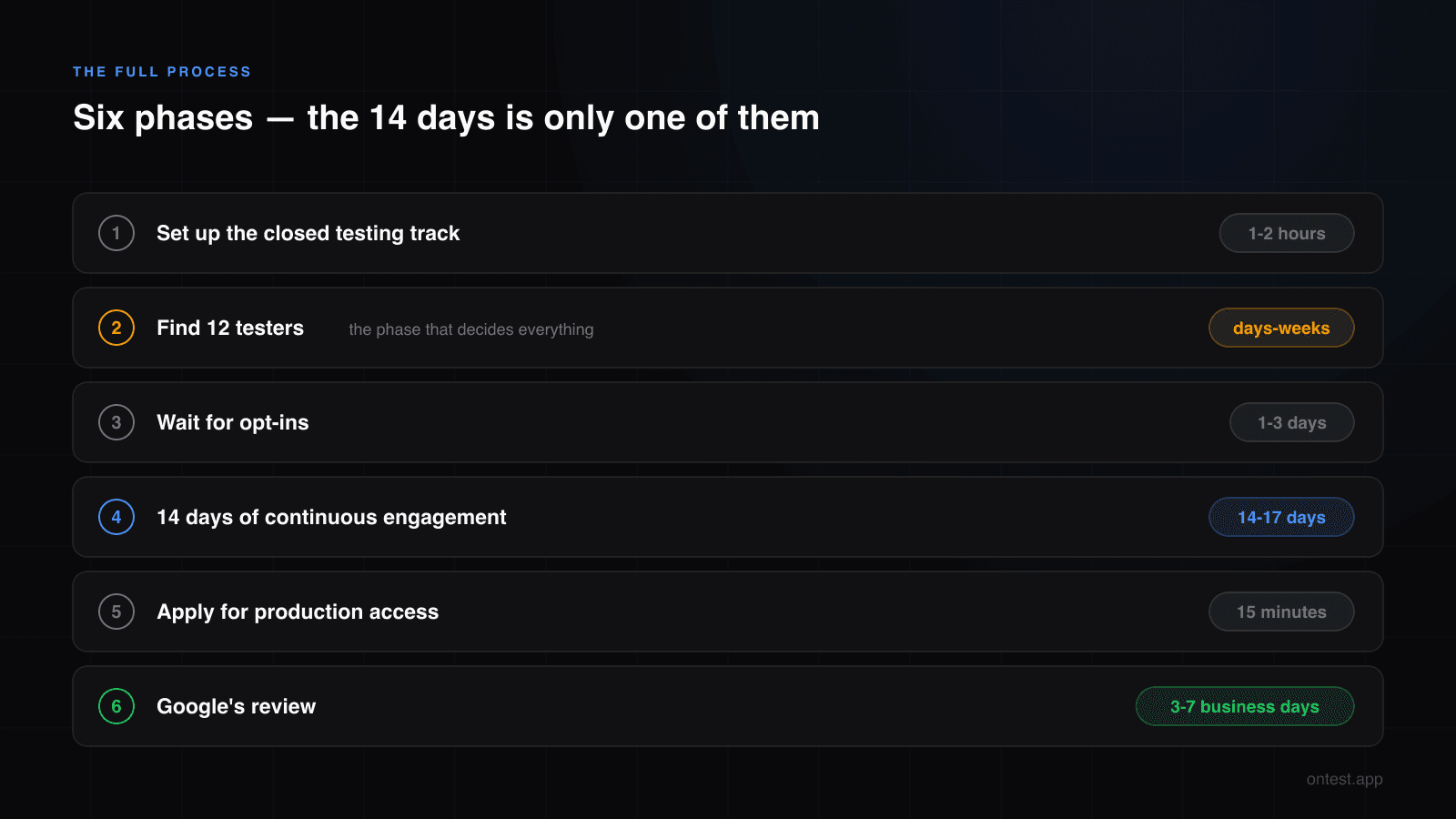
Six phases in total:
- Setting up the closed testing track
- Finding 12 testers (usually the longest phase, by far)
- Waiting for opt-ins
- 14 days of continuous engagement
- Applying for production access
- Google's review
Each one its own wait. Let's take them one at a time.
Phase 1: Setup (1-2 Hours, Don't Let Anyone Scare You)
Setting up the closed testing track in Play Console is actually easy. Motion Cues took my friend about two hours:
- AAB upload: 20 minutes (depends on your connection)
- Store listing, screenshots, description: 1 hour
- Content rating questionnaire: 30 minutes (the questions are annoyingly long)
- Closed testing track config: 15 minutes
This phase is one-time per app. Don't burn daylight here — this is the easy part. (If it's your first time in Play Console, the click-by-click setup walkthrough is here — it covers the four silent mistakes that stall launches without any error message.)
Phase 2: Finding 12 Testers (The Actual Hell)
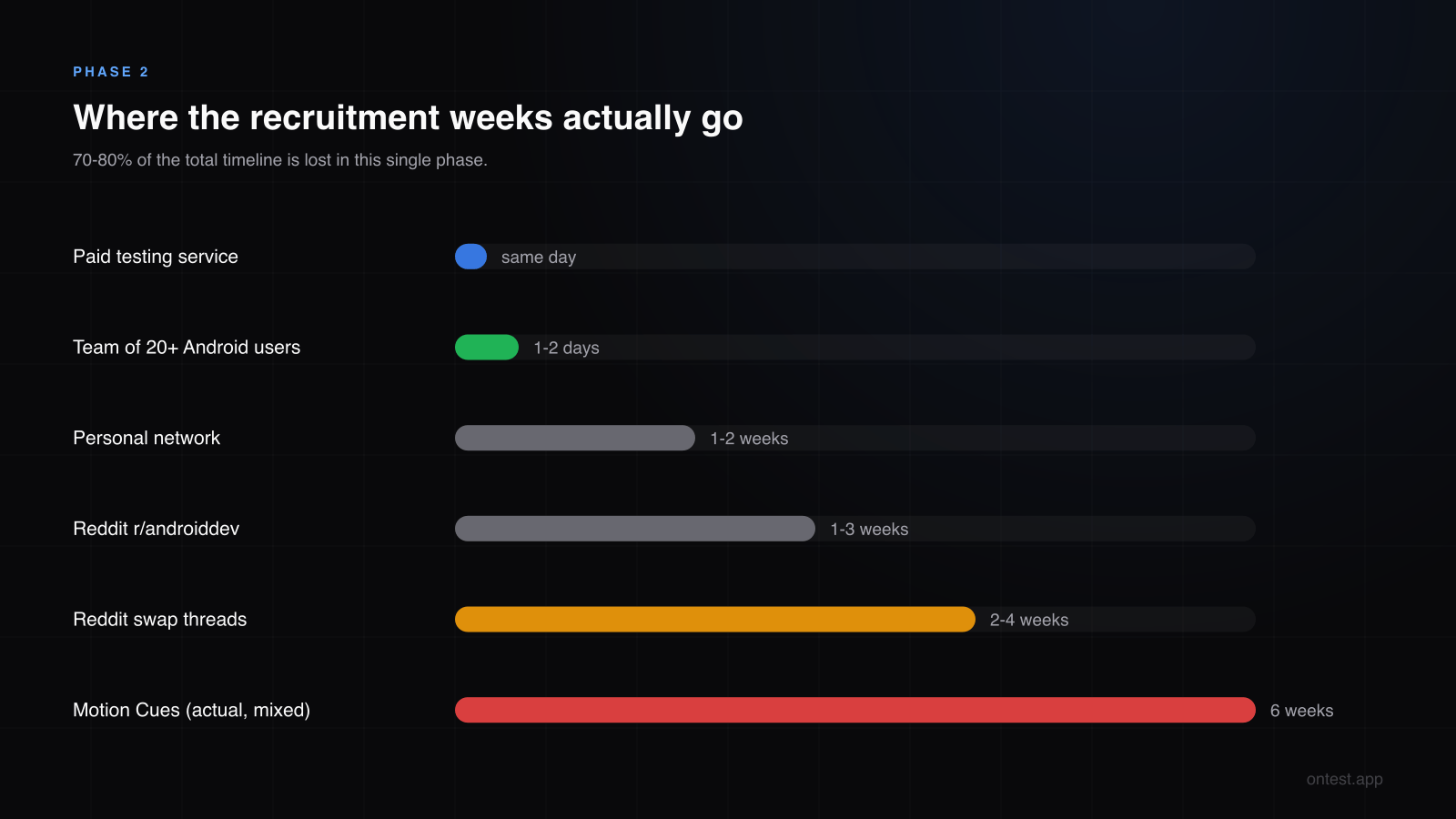
This is where 70-80% of the total timeline gets lost. How long it takes depends entirely on your approach — I later compared all seven recruitment methods side by side, but here's the short version.
The Fast Routes
If you use a paid testing service: Same day.
If you have a professional team of 20+ Android users: 1-2 days.
If you land a reliable Fiverr seller and get lucky: 2-3 days.
The Slow Routes (Where Most Developers Live)
Your personal network: 1-2 weeks, maybe 3-6 people. My friend's WhatsApp group had 40 developers; 3 used Android. I was one of them. We ended up recruiting family. Had to walk his mother through installing it on her Samsung, then asked her every morning: "Mom, did you open it today?" For 14 days.
Reddit r/androiddev: 1-3 weeks, maybe 5-8 people — if you don't get banned. Some subs have a dedicated "tester swap" thread and posting tester requests in the main sub counts as spam. Nobody warns you until you're already banned.
Reddit closed testing swap threads: 2-4 weeks, maybe 10-12 people. But do the math: 12 testers for your app = you opening 12 strangers' apps every day for 14 days = 168 days of testing other people's work. For your own launch.
Random Fiverr: 1-2 weeks, somewhere between 0 and 5 working testers, and a decent chance of losing the money. My friend paid $15 to one gig for Motion Cues. Got 12 emails. Two opted in. None opened the app. When he messaged the seller, they said "they forget sometimes." Yeah, they do.
Motion Cues total time on this phase: 6 weeks of mixed methods. Let it Rain took 3 weeks — he'd learned to start earlier and recruit more buffer.
Phase 3: The Opt-In Wait (1-3 Days, Sometimes Longer)
Finding 12 people doesn't mean you're done. Now you wait for them to click the opt-in link:
- Add tester emails in Play Console (5 minutes)
- Google automatically emails them the opt-in link (instant)
- They click, install, and opt in (1-3 days)
Sometimes longer. Motion Cues: 12 emails added, 9 opt-ins within 3 days. The remaining 3 took until day 5 — one found it in spam, one had changed phones, and one had just forgotten.
Important: the 14-day clock only starts once all 12 are opted in. At 11 it doesn't tick. If you have 11 testers active for 10 days, and the 12th finally joins on day 11 — the clock doesn't reset, but the start time resets to when the last tester joined.
One weird thing about this phase: after they opt in, testers don't have to open the app the same day. People get distracted. They open it the next morning. Google is tolerant on this — but if it happens in the final 3 days, you start getting nervous.
Phase 4: 14 Days of Active Engagement (Really 14-17 Days)
This is the rule. But what counts as "active"?
Google doesn't spell it out, but in practice: each tester opens the app at least once per day. Session length doesn't seem to matter. Daily touchpoints do. (I later unpacked the full opt-in vs install vs usage distinction in what counts as an "active" tester.)
My friend's log during Motion Cues:
- Days 1-3: All 12 active, opening every day. Smooth sailing.
- Day 5: An aunt calls: "I didn't open it yesterday, you were supposed to remind me." Okay.
- Day 7: One of the Fiverr testers has gone completely silent. Start wondering if they want another payment.
- Day 10: The 11 PM message. A tester has uninstalled.
- Days 11-14: "Please open the app today" messages to everyone.
The reality here: one drop-off doesn't always reset the counter. But the metrics will show a "warning," and after you submit for production access, Google might say "we've detected irregular testing activity" and ask you to run another 3 days. (If you've already received a message like that, here are the 5 real reasons closed tests get rejected and how to recover.)
So plan for 14-17 days, not exactly 14.
Phase 5: Applying for Production Access (15 Minutes, But Your Hands Will Shake)
Once the 14-day clock completes, the "Apply for production access" button activates in Play Console.
(Side note: the location of this button in Play Console UI is infuriating. Sometimes it's under "Production" in the left menu, sometimes "Release," sometimes "Testing." Google reorganizes this UI about twice a year, so by the time you're reading this, it's probably in a different place again.)
Click, fill the form:
- Developer info
- Final app description
- Content rating confirmation
- Privacy policy link
Submit.
15-minute task, technically. I'll admit my friend's hands shook a little. A month of work finally going up for final judgment.
The application itself includes a 10-question questionnaire that trips up many developers. We wrote a dedicated guide with copy-paste templates: Production Access Questionnaire: The 10 Questions Answered.
Phase 6: Google Review (3-7 Business Days, Usually)
This phase is entirely out of your hands. After submission, you can only wait for the email.
For my friend:
- Motion Cues: 4 days. Submitted Wednesday, approved Monday.
- Let it Rain: 6 days. Submitted Thursday, approved the following Wednesday.
Why the difference? Google Play review times depend on reviewer availability, content complexity, and policy flags. You don't control any of it. I broke down what affects the review time phase by phase in 2026 — including why the day you submit matters.
Worst case: rejection. If you've broken a policy, messed up metadata, or uploaded low-quality screenshots, you'll be rejected. Fix it and resubmit. Another 3-7 day wait. (And if the rejection says "more testing required," start with the rejection recovery guide before resubmitting.)
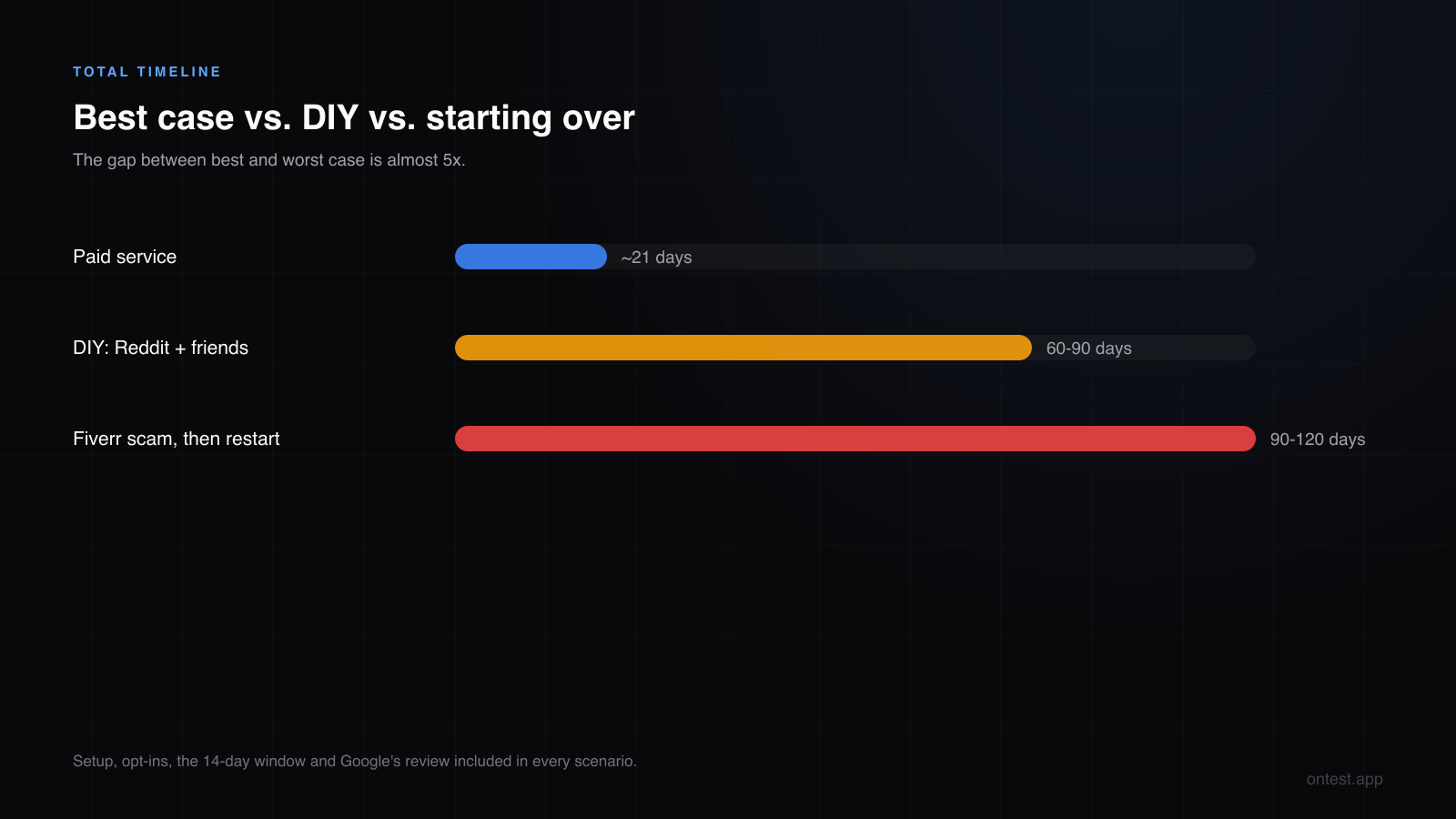
Total Timeline: Three Scenarios
Adding every phase:
Using a Paid Service
Setup (1 day) + Finding testers (0 days — immediate) + Opt-ins (1 day) + 14 days testing + Submit (same day) + Google review (5 days) = ~21 days.
DIY with Reddit + Friends
Setup (1 day) + Finding testers (4-6 weeks) + Opt-ins (3-5 days) + 14-17 days testing + Submit + Google review (5-7 days) = 60-90 days.
Fiverr Scam Then Starting Over
Setup (1 day) + Fiverr waste (2 weeks, money gone) + Starting over (3-6 more weeks) + everything else (25-30 days) = 90-120 days.
The gap between best and worst case: almost 5x.
Tactics to Cut Down the DIY Timeline
If you're determined to do this yourself, here's how to lose fewer days:
Start recruiting testers before the code is done. When your build is about 80% complete, begin reaching out. Code polish and testing can run in parallel. You'll save weeks.
Recruit more than 12. Target 15-18 testers. Drop-offs are inevitable; a buffer absorbs them. Google doesn't cap tester count — you could add 100 if you wanted.
Pre-create test accounts. If your app requires login or has premium features, send testers ready-to-use credentials. Skip the "let me sign up first" step that causes friction.
Push APK updates in the first 3 days of testing. Don't update in the last stretch. Testers need to install the new version, and half of them will forget.
Enable Play Console email reminders. Google sends automated emails when tester activity drops. Mirror those with your own nudges.
And one general rule: the 14-day period is a marathon, not a sprint. Stay in touch with your testers daily. When they're consistent, thank them. The emotional part of this phase is the most draining — not because of effort, but because so little is in your control.
The Waiting Strategy
What do you do during those 14 days? My friend tried two approaches.
Motion Cues (first app): Refresh Play Console every two hours. Tester offline? Why? Send another WhatsApp message. Anxiety climbing daily.
Let it Rain (second app): Close Play Console. Check twice a week. Spend the rest of the time thinking about his next app.
Which is right? The second one. We learned the hard way during Motion Cues that obsessive checking doesn't change anything.
The Real Takeaway
If you've just finished coding and you're starting your first production launch: expect 60-90 days on the traditional route.
When someone tells you "14 days," they mean the testing phase only. Not the total.
This post exists so your expectations are calibrated. If you're planning your launch date, budget accordingly.
How onTest Cuts This Timeline by 4x
onTest solves the longest phase — finding 12 testers and coordinating opt-ins — within hours. After you order:
- Day 0: Order placed. 12 testers assigned (real Android users, real devices).
- Day 1: All opted in. Engagement begins.
- Days 1-14: Daily activity tracked on a live dashboard.
- Day 14: Testing complete.
- Day 15: You apply for production access.
- Days 18-22: Google approves.
Total: 18-22 days. Roughly 4x faster than the 90 days Motion Cues took. One flat package: 12 testers, 15 days, $19.99.
Related guides
- Google Play's 12 Testers 14 Days Requirement Explained — Every clause of the rule, who's exempt, and how the clock really behaves.
- How to Set Up Google Play Closed Testing: Step-by-Step — Phase 1 in click-by-click detail.
- How to Get 12 Testers: 7 Methods Compared — The phase that decides your timeline, solved channel by channel.
- Google Play Closed Testing Review Time in 2026 — Phase-by-phase review durations with my actual dates.
- Closed Testing Rejected? 5 Reasons Why — What to do when Google says "more testing required."
- Production Access Questionnaire: 10 Questions Answered — Copy-paste templates for the final form.
If you're going through this process right now (or about to), drop me a line at hello@ontest.app — even two sentences. Good luck with your launch.
Ready to ship your Android app?
Get 12 real testers for Google Play Closed Testing in 14 days.
Get Started