Why onTest Is Different: One Honest Package for Your 12 Testers 14 Days Closed Test (Plus Premium Devices and Expert Review)
Other services sell tiered 12/20/25-tester bundles for 14 days closed testing. onTest sells one package sized to exactly what Google requires: 12 real devices, 15 days, $19.99 flat, with a 3-day money-back guarantee, premium Android 14+ hardware and optional expert review by a 10+ year Android dev.
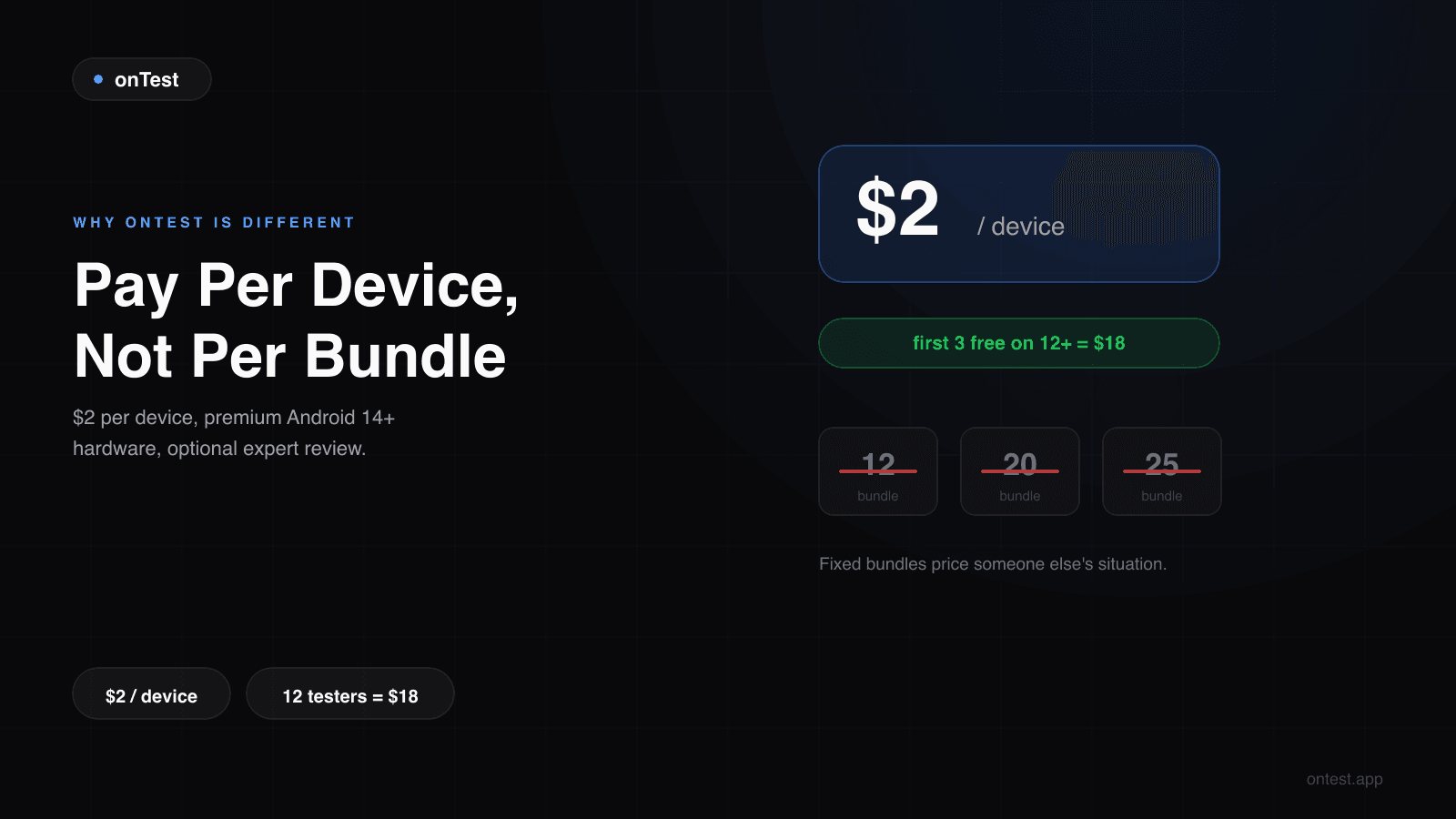
When I started building onTest, I spent two days reading every competitor's pricing page in this market. Every single one sold the same thing for the 12 testers 14 days requirement:
Starter. Professional. Enterprise. 12 testers. 20 testers. 25 testers. Tier tables everywhere.
That's it. That's the menu. And here is the strange part: Google's requirement is a constant. It asks for 12 testers, active for 14 consecutive days. Not 20. Not 25. Twelve.
So why does every pricing page look like a SaaS tier table? Because tiers are good for upselling, not because your app needs 25 testers. The "Professional" bundle with 20 testers exists to make the 12-tester starter look small, and the 25-tester "Enterprise" tier exists to make the 20 look reasonable. Meanwhile the number that gets you approved has been printed in Google's policy the whole time: twelve.
I built onTest around that constant. This post explains three concrete things onTest does differently: one honestly sized package, a premium real-device portfolio, and optional expert review by someone who's actually shipped Android apps for the last decade.
If you're shopping closed testing services this week, this is the comparison you won't find on a vendor's landing page.
Difference #1: One Package, Sized to the Requirement (Not a Tier Table)
Every other service in this space sells bundles for the 12 testers 14 days requirement. The pitch is always the same: "12 testers, $14.99." "20 testers, $24.99." "25 testers, $19.99."
This pricing model exists because it's easy to upsell, not because it's right for you.
Here's what onTest sells instead:
One package. 12 real devices. 15 days of testing (the 14 Google requires plus 1 bonus day). $19.99. That's the entire pricing page.
The structure behind it:
- 12 devices — exactly Google's minimum, and the number that gets you approved. Not 8 that leave you short, not 25 you'll never look at.
- 15 days, not 14 — one bonus day of engagement on top of the required window, so a slow first day never puts your streak at risk.
- Drop-off protection built in — if a device goes quiet, a replacement joins the test. This is why you don't need the 15-16 tester "safety buffer" that DIY recruitment requires.
- 3-day unconditional money-back guarantee — full refund within 3 days of purchase, no questions asked, no forms.
Why does this matter for approvals? Because Google doesn't look at how many testers you bought — it looks at how many active testers you have on day 14. The number that gets you approved is the active count at the end of the window, not the receipt total. Paying for a 20 or 25-tester bundle doesn't improve your odds; it just improves the vendor's average order value. (What "active" actually means is a separate deep dive.)
There is no upsell path at onTest because there is nothing to upsell. The only optional extra is the Expert Analysis Report, which is a genuinely different product (more on that below).
Difference #2: A Real Premium Device Portfolio (Not Just a Brand List)
Every competitor's site uses the same line:
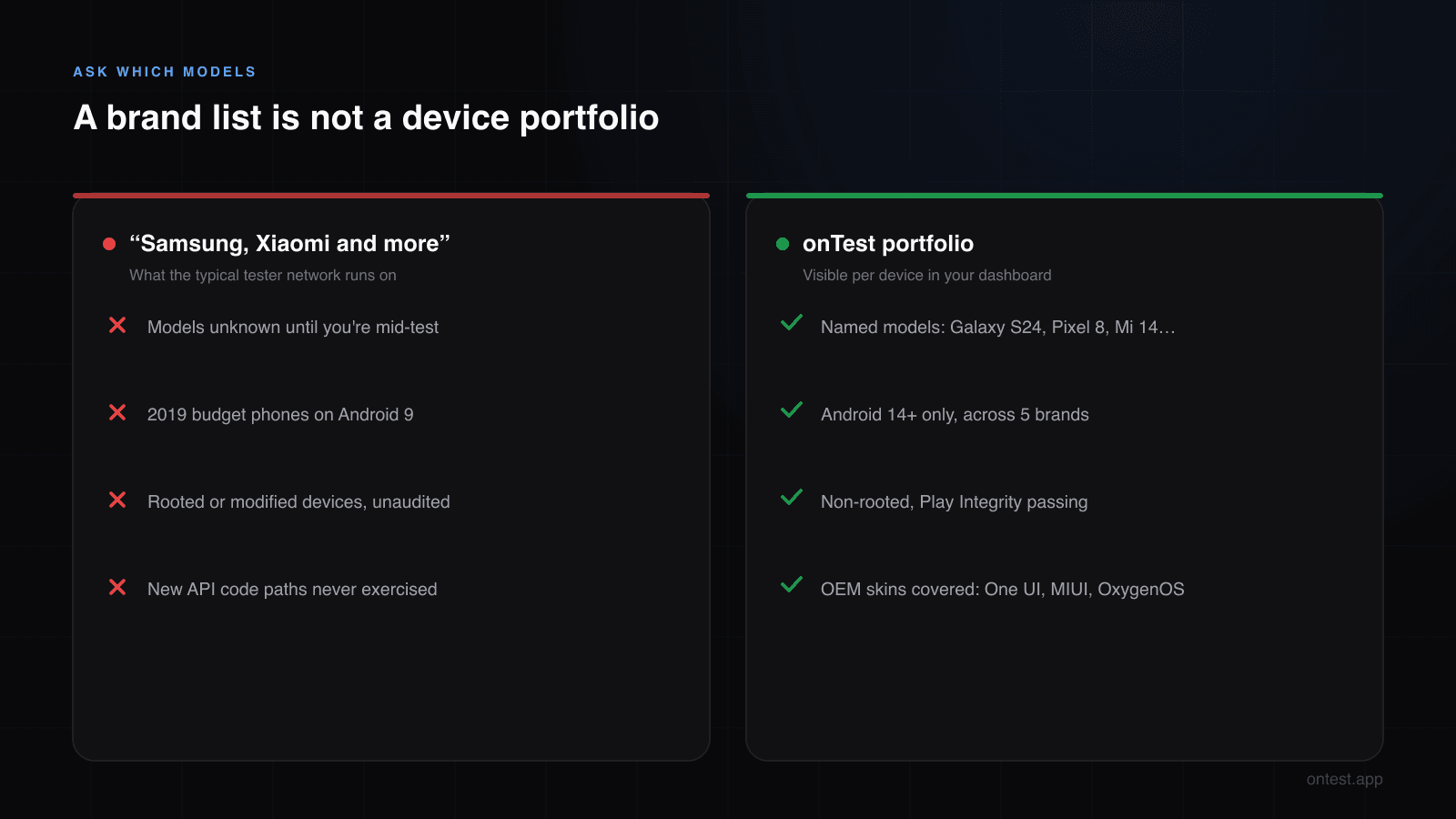
"Real testers on real devices — Samsung, Xiaomi, Pixel, OnePlus, and more from 120+ countries."
It sounds impressive until you ask the obvious follow-up: which models, specifically, and what condition?
Most testing services route through tester networks where the cheapest possible Android device is the most common. A 2019 Samsung Galaxy A10 running Android 9 technically counts as "Samsung Android." So does a $80 entry-level Xiaomi. Google doesn't reject the install — but a five-year-old budget phone tells you nothing about how your 2026 app behaves on devices your real users actually have.
What onTest's device portfolio actually looks like
The current pool runs on Android 14 and newer, on devices people genuinely use in 2026:
Samsung — Galaxy S series (S22, S23, S24) and A series (A54, A55) for mid-range coverage Google — Pixel 7, Pixel 8, Pixel 8a — clean Android, no OEM customization Xiaomi — Mi 13, Mi 14, Redmi Note 13 Pro Nothing — Nothing Phone 1, Nothing Phone 2 — increasingly popular, often missed by competitors OnePlus — OnePlus 11, OnePlus 12
All devices are non-rooted, non-modified, real consumer hardware running stock OEM Android or close to it. No rooted phones, no custom ROMs, no emulator-on-Android-TV setups.
Why this matters in practice
Three real-world failure modes that low-quality device pools cause:
1. Old Android versions miss new API behaviors. If your app uses Android 13+ features (notification permissions, themed icons, predictive back gestures, Photo Picker, partial media access on Android 14), testing on Android 9 tells you nothing about the actual user experience. You'll get "approved" without anyone exercising the code paths your real users will hit.
2. Rooted/modified devices distort engagement signals. Google's review algorithm checks behavior patterns. Rooted devices with unusual configurations, zero battery decay, or missing sensors trigger flags — even when the tester is a real human. Some competitors don't audit this; you find out when your production access gets rejected for "irregular testing activity." (How Google detects fake devices and dead engagement is a separate deep dive.)
3. Same-brand monoculture skews your bug surface. A pool that's 80% Samsung means Xiaomi-specific keyboard bugs, Nothing-specific gesture conflicts, and Pixel-specific Material You theming issues never get caught. The cross-brand portfolio above isn't a marketing list — it's actively built to surface OEM-specific problems before your real users do.
When you check the onTest dashboard during testing, every device shows its actual model and Android version. No vague "Android device" labels. You can verify exactly what's covering your app.
Difference #3: Optional Expert Review by Someone Who Ships Android Apps
This is the difference that came out of who I am, not from a market analysis.
I've been working as an Android developer for more than 10 years. I've shipped apps to production, debugged ANRs at 2 AM, dealt with Play Store rejections that had nothing to do with closed testing, and watched the platform evolve from Eclipse + ADT through Kotlin + Compose. I built onTest after watching my friend lose three months to closed testing on two perfectly good apps — but the developer skills are the deeper background.
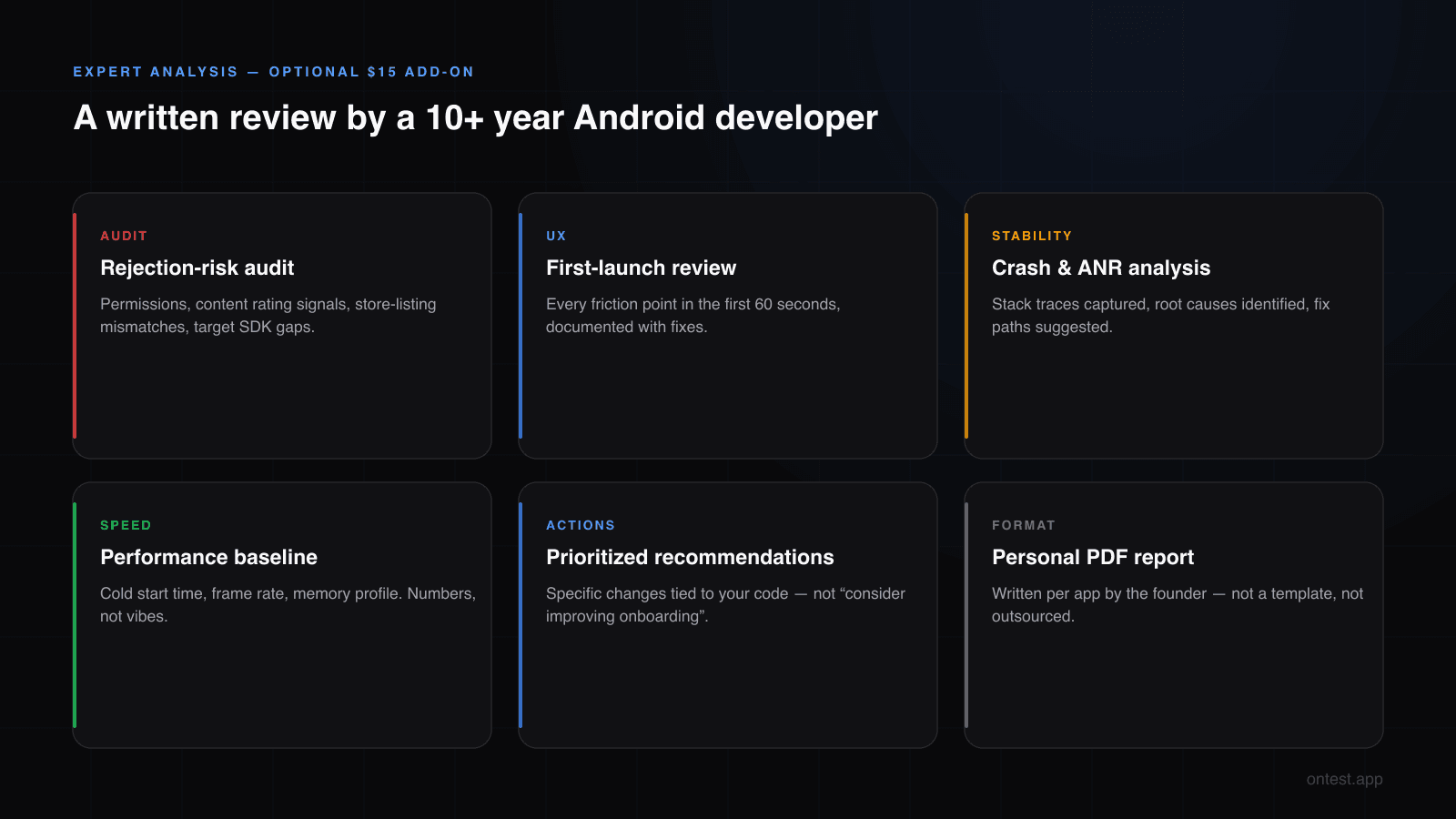
So I added something none of the bundle-sellers offer: Expert Analysis Report, an optional $19.99 add-on where I personally review your app and deliver a written assessment.
What the Expert Analysis includes
A PDF report covering:
Rejection-risk audit — I pull your app from the closed testing track, run it on multiple devices, and check for the patterns that trigger Google rejection: incorrect permission declarations, missing content rating signals, store-listing mismatches, target SDK gaps, accessibility violations.
UX & first-launch review — Indie developers consistently underestimate how confused a brand-new user is on first launch. I run through your app as if I've never seen it, document every friction point in the first 60 seconds, and suggest specific fixes.
Crash patterns and ANR risk — If your app crashed even once during my review, I capture the stack trace, identify likely root cause, and suggest a fix path. For apps with native code (Kotlin Multiplatform, NDK), I check for common JNI pitfalls.
Performance baseline — Cold start time, frame rate on common screens, memory profile. Numbers, not vibes.
Concrete recommendations, prioritized — Not "consider improving onboarding." Specific changes: "Move the permission request from MainActivity.onCreate() to after the first feature interaction. Current placement is causing 22% of testers to deny it."
Why this isn't possible in the bundle model
The companies selling 12/20/25 tester packages aren't run by senior Android engineers. They're run by people who built tester recruitment systems. That's a different skill — both are valuable, but they don't overlap.
When a bundle service writes "production access questionnaire help" as a bonus feature, they mean a template document. When I do it, I look at your feedback, your version history, and your questionnaire draft, and I tell you specifically what to change.
If you found a serious bug during testing and you're stuck on the fix — for some customers I've directly contributed code review or a small patch. Not as a paid contracted-out service, but as the founder caring whether your app ships.
The Expert Analysis is $19.99, optional. Most customers don't need it. Solo developers on their first launch, or anyone whose previous attempt got rejected, are the ones who get the most value.
The Honest Tradeoffs
I'm going to do something competitors won't: tell you when onTest is not the right choice.
Don't use onTest if the absolute lowest sticker price is your only criterion. A bundle service's $14.99 starter beats our $19.99 package by five dollars. If that $5 matters more than device specs, drop-off protection, the bonus day, and the refund guarantee, save the money.
Don't use onTest if you have an organization developer account. You're exempt from the 14-day closed testing requirement entirely (here's who the rule does and doesn't apply to). No service is right for you. Just publish.
Don't use onTest if you want someone to pretend they control Google's review queue. Nobody does. Google sometimes rejects production access for reasons unrelated to testing: policy issues, store listing problems, content rating mismatches. What we offer instead is a 3-day unconditional money-back guarantee, plus a free re-run of the whole test if Google doesn't grant production access after a completed test. What we don't offer is a promise about Google's decision, because nobody can make that promise honestly. The refund policy spells out both, including why TWA and web-wrapper apps are handled differently.
Use onTest if a right-sized package, premium device specs, or expert review actually move the needle for your situation. That's the customer this service is built for.
What the Package Looks Like in Practice
The clearest way to understand the offer is to pick the situation closest to yours:
"I have zero testers, first launch, just need to pass closed testing" One package = $19.99 total. Same price ballpark as competitors' mid tiers, with the device portfolio upgrade and drop-off protection included.
"I have a few friends already testing" Their feedback stays valuable, but the package carries the requirement: 12 devices active daily for the full window, independent of your friends' consistency. No more chasing people on day 9.
"I got rejected and want to redo it properly with an expert review" Package + Expert Analysis = $19.99 + $19.99 = $39.98 total. Competitors charge $24.99-$30 for oversized bundles and don't offer expert review at any price.
"I'm not sure yet whether this is the right service" Order it and decide within 3 days. The money-back guarantee is unconditional — if anything about the service isn't what you expected, you get a full refund without explaining yourself.
The flat package isn't the cheapest sticker in the market. It's the right shape for the requirement: exactly what Google asks for, nothing you don't need, backed by a refund you don't have to argue for.
Try It This Week
If any of the three differences resonate — a right-sized package, premium device portfolio, or expert review by an actual Android engineer — onTest will be a better fit for your 12 testers 14 days closed testing than the bundle tiers you've been comparing.
12 real devices. 15 days of active testing (14 required plus 1 bonus). $19.99 flat. 3-day money-back guarantee.
If you want to talk through your specific situation before ordering — especially if you've been rejected before during the 14 days — email me directly at hello@ontest.app. As the founder I read everything that comes in.
Frequently Asked Questions
Does onTest meet Google's 12 testers 14 days requirement?
Yes. The package delivers 12 active testers across all 14 days of the closed testing window, plus 1 bonus day on top. If a device drops off, a replacement joins automatically, so the active count holds without you managing a buffer.
How much does it cost to get 12 testers for 14 days?
$19.99, flat. One package covers 12 real devices and 15 days of testing. One-time payment, no subscription, and a 3-day unconditional money-back guarantee.
Why sell one package instead of bundle tiers like everyone else?
Because Google's requirement is a constant: 12 testers, 14 days. Tier tables with 20 and 25-tester bundles exist to upsell, not to serve the requirement. One package sized to the rule means you never pay for testers whose data you'll never look at.
Are the devices really running Android 14 and newer?
Yes. Every device in the current pool runs Android 14 or higher and is non-rooted. The dashboard shows the actual model and OS version for each device covering your app. Older Android versions are not used because they fail to exercise the code paths your real 2026 users will hit.
What brands and models are in the device portfolio?
Samsung Galaxy S22/S23/S24 and A54/A55, Google Pixel 7/8/8a, Xiaomi Mi 13/14 and Redmi Note 13 Pro, Nothing Phone 1/2, OnePlus 11/12. The mix is intentionally cross-brand to surface OEM-specific bugs.
Who writes the Expert Analysis Report?
Turgay Ulutaş, founder of onTest and a working Android developer with 10+ years of shipping experience. Not a template, not outsourced — a personally written PDF for each app that orders it.
What does the Expert Analysis cost and what's in it?
$19.99 add-on at checkout. The PDF covers rejection risk audit, UX & first-launch review, crash/ANR analysis, performance baseline, and prioritized concrete recommendations.
Is $19.99 more expensive than competitors' $14.99 starter?
On raw sticker price, yes — by $5. The extra buys named Android 14+ devices, automatic drop-off replacement, a 15th bonus day, and a 3-day unconditional refund. If $5 is your deciding factor, a bundle service is fine.
What if my app gets rejected by Google after testing?
If Google doesn't grant production access after your completed test, we re-run the full test at no cost. If the rejection was caused by something on your side (policy issues, store listing, content rating), the Production Access Questionnaire guide walks you through fixing the underlying issue before the re-run. What happens after the re-run, and how TWA and web-wrapper apps are treated, is set out in the refund policy.
What happens if testers drop off mid-test?
Replacements join automatically to keep your active count at 12. You'll see the swap in the dashboard, and your Play Console streak stays intact. This is built into the package, not an extra.
How does the 3-day money-back guarantee work?
Email hello@ontest.app within 3 days of purchase and you get a full refund. No reason required, no forms, no "let us fix it first" loop. After 3 days, the approved-or-your-money-back guarantee still covers the outcome.
Do you work with organization developer accounts?
Organization accounts are exempt from the 14-day closed testing requirement, so you typically don't need onTest. If you want device-diverse QA before launch anyway, the same package works for that too.
Related guides
- Google Play's 12 Testers 14 Days Requirement Explained — The rule all these services exist for, clause by clause.
- How to Get 12 Testers: 7 Methods Compared — Paid services are one of seven options; here's the honest comparison.
- Why Real Human Testers on Real Devices Matter — The engagement signals behind the device portfolio.
- Closed Testing Rejected? 5 Reasons Why — If you're comparing services after a rejection, read this first.
- Google Play Production Access Questionnaire: The 10 Questions Answered (2026 Templates) — Copy-paste templates for the form Google asks after your 14 days.
- How Long Does Google Play Closed Testing Actually Take? (2026 Real Timeline) — The full timeline from setup to approval.
- My Friend's Two Android Apps, Three Months Lost, and Why We Built onTest — Why this service exists in the first place.
Questions about whether onTest fits your situation? hello@ontest.app — I read every email personally.
Ready to ship your Android app?
Get 12 real testers for Google Play Closed Testing in 14 days.
Get Started