Why Real Human Testers on Real Devices Matter: Google Play Closed Testing Isn't Just a Number Game
Google doesn't just count your 12 testers — it measures engagement. Fake testers get flagged, emulators get detected, and 'install-and-forget' services get you rejected. Here's why real humans on premium devices with daily screenshot proof are the only reliable path to production access.
Last month a developer emailed us. He'd paid $15 on Fiverr for "12 testers, 14 days, guaranteed." Day 15 arrived, he submitted his production access form, and Google came back with:
"We need you to continue testing your app with real testers."
He was confused. He had 12 testers. He had 14 days. What went wrong?
Everything. Because Google Play doesn't just count testers. It measures what those testers actually do.
This post explains the three things Google's algorithm actually looks for during closed testing — and why real human testers, premium device diversity, and daily proof of engagement are the only combination that consistently gets approved.
Google's Algorithm Is Smarter Than You Think
When Google introduced the 12 testers, 14 days requirement, most developers assumed it was a simple checkbox:
- ✅ 12 emails opted in
- ✅ 14 days passed
- ✅ Done
That's not how it works.
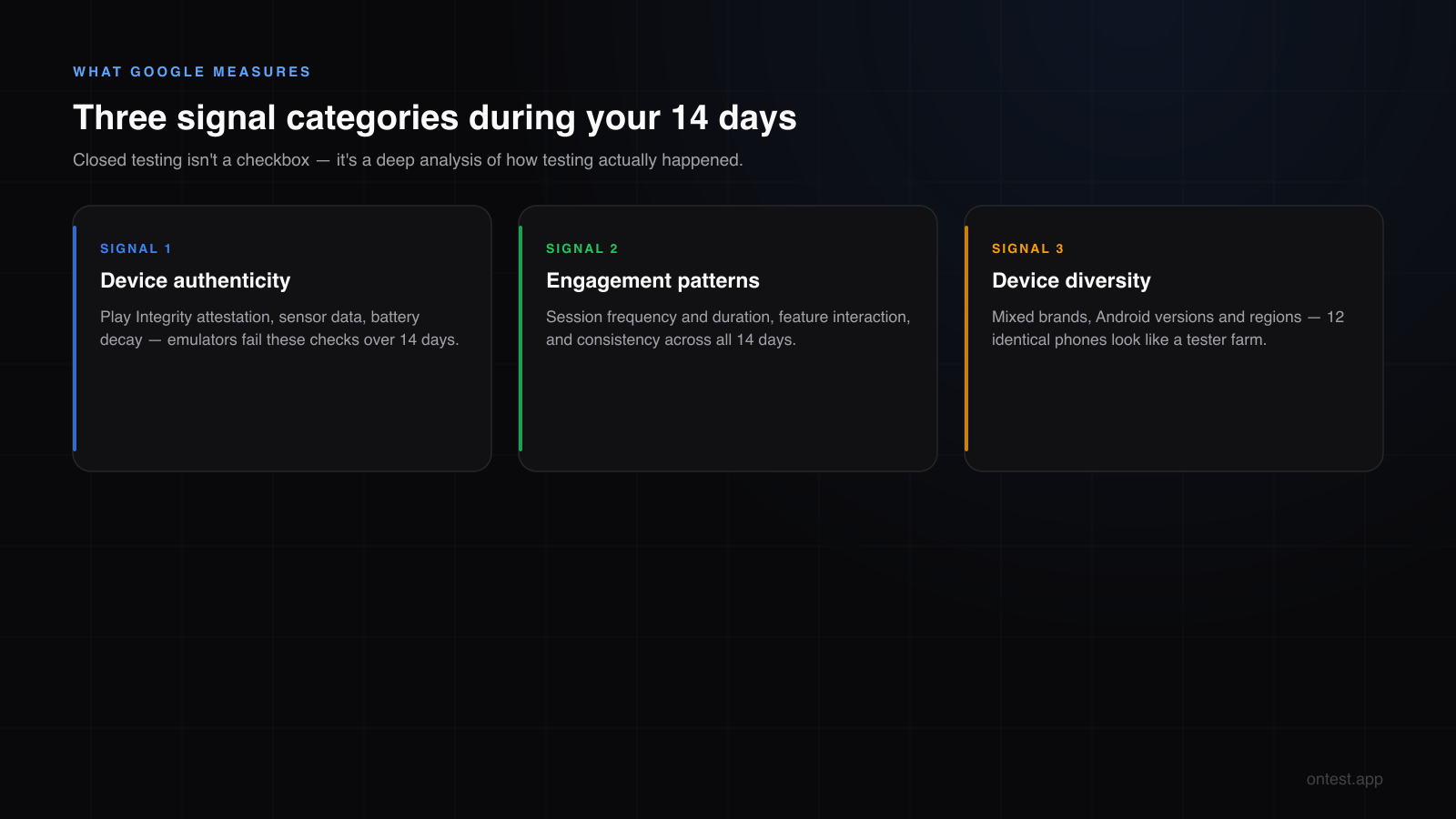
Google Play Services runs deep analysis during your closed testing window. It checks three categories of signals:
Signal 1: Device authenticity
Google detects emulators. It checks for x86 architecture pretending to be ARM, zero battery decay, missing accelerometer data, and absent Google Play Services attestation. If even a few of your "testers" are running emulators, the entire test is compromised.
This is why cheap services that route through cloud emulator farms fail. The installs register, but Google flags them as non-genuine devices.
Signal 2: Engagement patterns
Google doesn't just check "did they install it?" It looks at:
- Session frequency — Is the app being opened regularly, or was it installed once and never launched again?
- Session duration — Are testers actually navigating through the app, or does it open for 2 seconds and close?
- Feature interaction — Are different screens being accessed? Are core features being used?
- Multi-day patterns — Is there consistent activity across the 14 days, or just a spike on day 1 and silence?
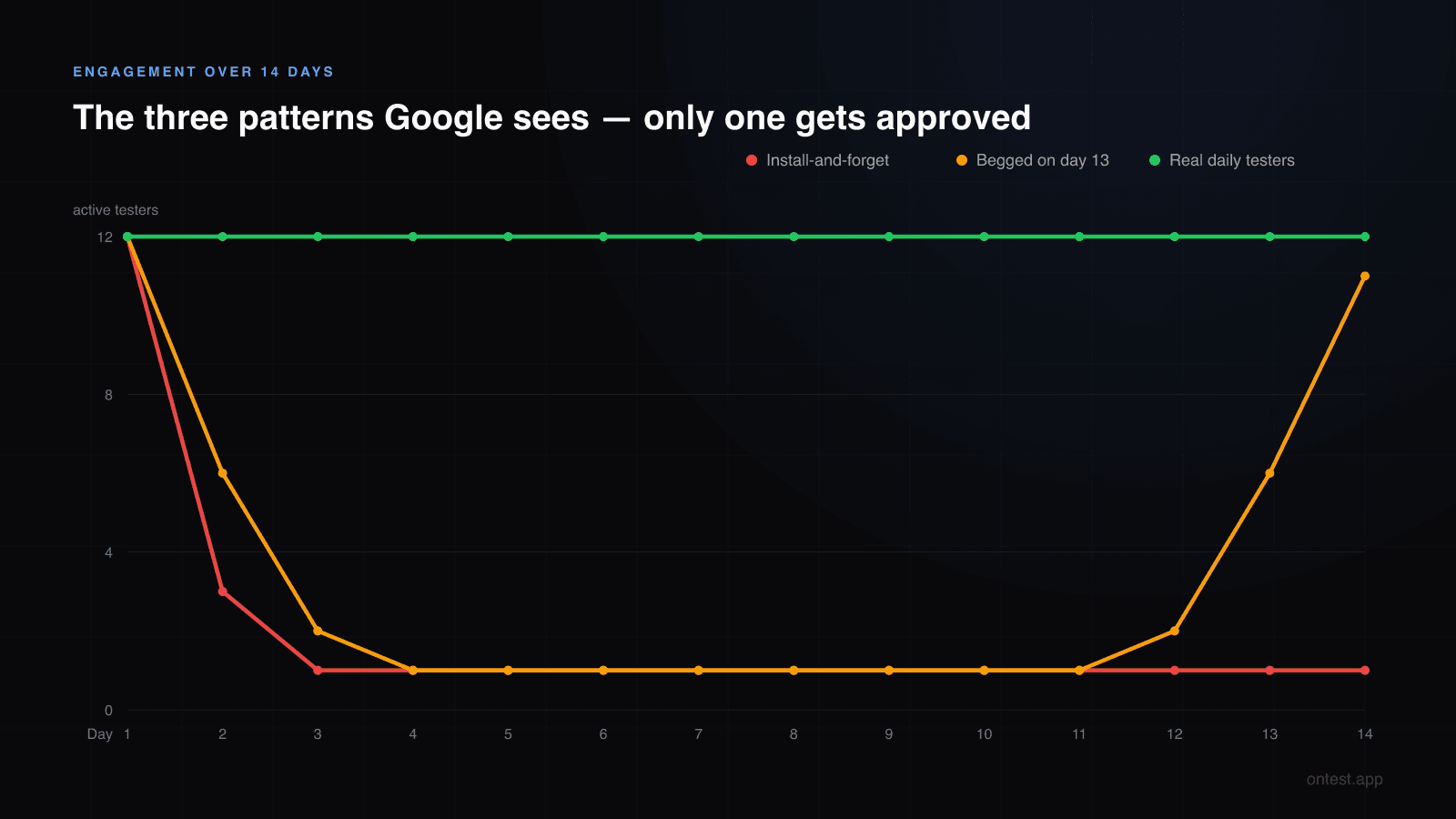
A Fiverr tester who installs your app and never opens it again generates a flat engagement line. Google sees that. A Reddit swap partner who begrudgingly opens your app for 3 seconds a day generates a barely-there engagement signal. Google sees that too. (This is why the recruitment channel matters so much — here's how all seven compare on engagement quality.)
Real human testers who actually use your app generate the organic engagement pattern Google expects: varied session lengths, different features accessed, natural gaps between sessions, activity spread across the full 14 days. (The full breakdown of opt-in vs install vs daily usage — and which level Google actually evaluates — is here.)
Signal 3: Device diversity
If all 12 of your testers are on the same device model, same Android version, same region — that's a red flag. Real user bases are diverse. Google's algorithm reflects that expectation.
A test pool with Samsung Galaxy S23, Pixel 8, Xiaomi Mi 14, Nothing Phone 2, and OnePlus 12 looks like a real user base. Twelve identical Samsung Galaxy A10s running Android 9 from the same IP block look like a tester farm.
What Happens When You Use Fake or Low-Quality Testers
Let's be specific about the failure modes. These aren't hypothetical — they come from real developers who emailed us after getting rejected. (If you're in that situation right now, the full rejection recovery plan is here.)
Failure mode 1: "More testing required" after 14 days
What happened: Developer bought a cheap tester package. All 12 emails opted in. 14 days passed. Applied for production. Got rejected with "continue testing."
Why: The testers installed the app but never opened it. Zero engagement data for Google to evaluate. From Google's perspective, the testing never actually happened — it was just 12 opt-ins sitting idle.
Failure mode 2: Emulator detection flag
What happened: Developer used a service that claimed "real testers" but actually ran installs on cloud emulators. Google flagged "irregular testing activity."
Why: Google Play Services SafetyNet (now Play Integrity API) checks hardware attestation. Emulators fail basic integrity checks. Even sophisticated emulators with spoofed fingerprints get caught because they can't fake sensor data patterns over 14 days.
Failure mode 3: Single-brand monoculture
What happened: Developer's testers were all on budget Samsung phones running Android 10-11. App used Android 13+ APIs (notification permissions, Photo Picker, predictive back). Approved — but crashed for 40% of real users on day one.
Why: This isn't a Google rejection — it's worse. The testing "passed" but caught zero real-world bugs because the device pool didn't match the target user base. The 14 days were wasted.
Failure mode 4: Engagement cliff on day 2
What happened: Reddit swap testers were enthusiastic on day 1, opened the app twice on day 2, then disappeared until day 13 when the developer begged them to open it again.
Why: Google's engagement model looks at consistency across 14 days. A U-shaped activity graph (day 1 spike, dead zone, day 14 spike) signals forced behavior, not genuine testing.
Why onTest Uses Real Human Testers (And What That Actually Means)
When I say "real human testers," I don't mean "not bots." Every competitor claims that. I mean something specific and verifiable:
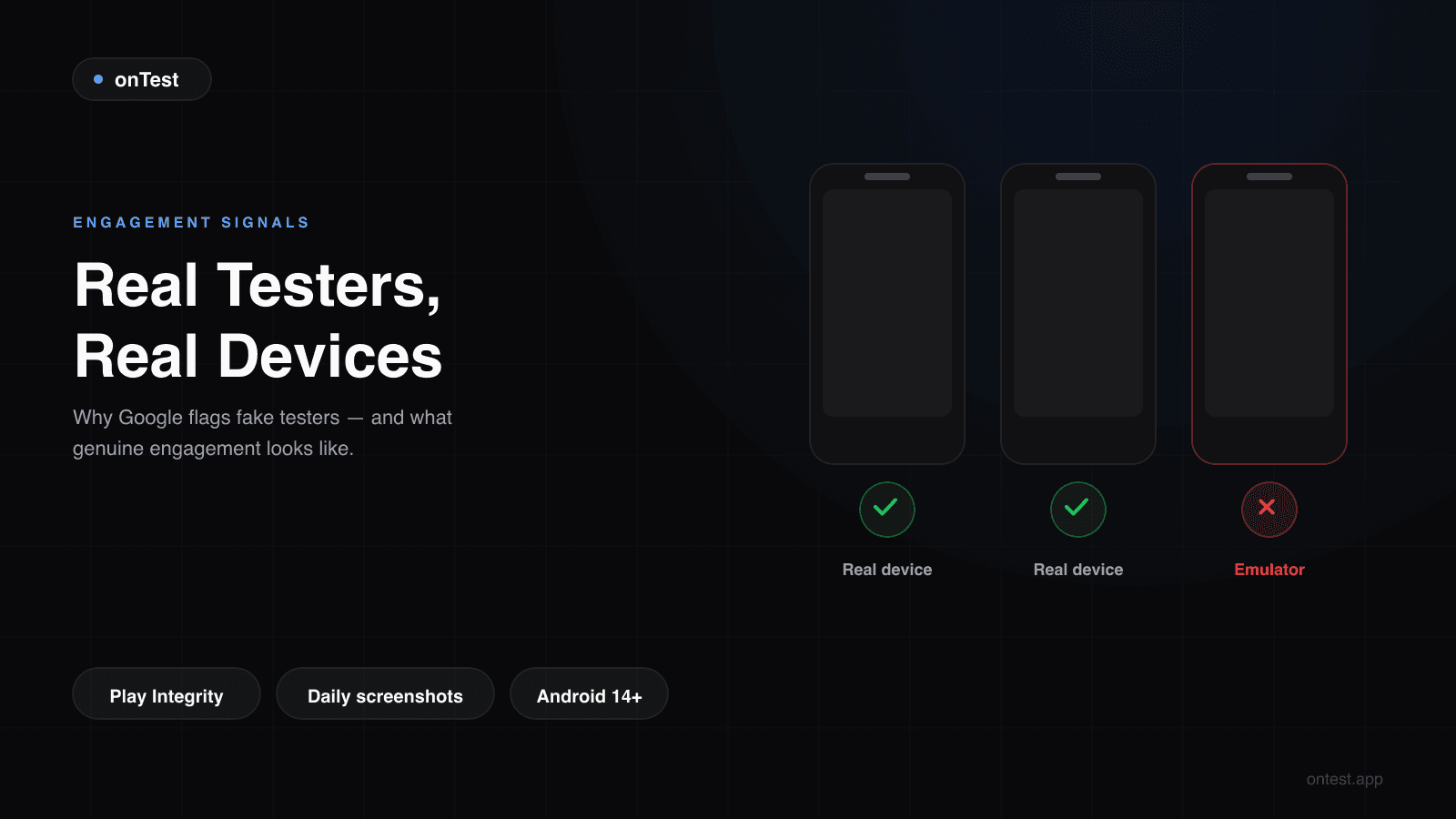
Every tester in our network is a real person using a real Android device as their daily phone.
Not a dedicated testing device sitting in a drawer. Not a secondary phone they pick up once a day. Their actual phone — the one they carry, charge, use for WhatsApp, check the weather on, browse Instagram with.
Why does this matter? Because a daily-use phone generates the engagement patterns Google expects:
- The app appears in the recent apps tray alongside real apps
- Sessions happen at natural times (morning, lunch, evening) — not at 3 AM from a script
- The device has real sensor data, real battery cycles, real network switches between WiFi and mobile data
- Google Play Services sees a complete, healthy device profile — not a sterile test environment
How we verify this
Every device in the onTest network goes through verification:
- Device model and Android version confirmed — visible in your dashboard, not hidden behind a "real devices" claim
- Non-rooted, non-modified — stock OEM Android or close to it
- Play Integrity passing — the same check Google runs, we run first
- Active Google account with history — not a freshly created Gmail for the sake of opting in
You can see every device's model, OS version, and status on the onTest dashboard during your 14-day test. No vague "Android device" labels. Full transparency.
Premium Device Portfolio: Not a Marketing Line
Here's the device pool your app gets tested on:
| Brand | Models | Android Version |
|---|---|---|
| Samsung | Galaxy S22, S23, S24, A54, A55 | Android 14-15 |
| Pixel 7, Pixel 8, Pixel 8a | Android 14-16 | |
| Xiaomi | Mi 13, Mi 14, Redmi Note 13 Pro | Android 14-15 |
| Nothing | Phone 1, Phone 2 | Android 14-15 |
| OnePlus | 11, 12 | Android 14-15 |
This isn't a random grab bag. It's intentionally built to cover:
- Flagship and mid-range — because your real users have both
- Stock Android and heavy OEM skins — Samsung One UI, Xiaomi MIUI, Nothing OS all behave differently
- Multiple screen sizes and aspect ratios — Galaxy S24 vs Pixel 8a vs Nothing Phone 2 all have different viewport dimensions
- Current Android versions — Android 14+ means your app's modern API usage (notification permissions, themed icons, predictive back, per-app language preferences) actually gets exercised
When a competitor says "Samsung, Xiaomi, Pixel, and more" — ask them which models. If they can't tell you, the pool is whatever the cheapest device in their tester network happens to be.

Daily Screenshots: Proof That Testing Is Actually Happening
This is the feature that makes the invisible visible.
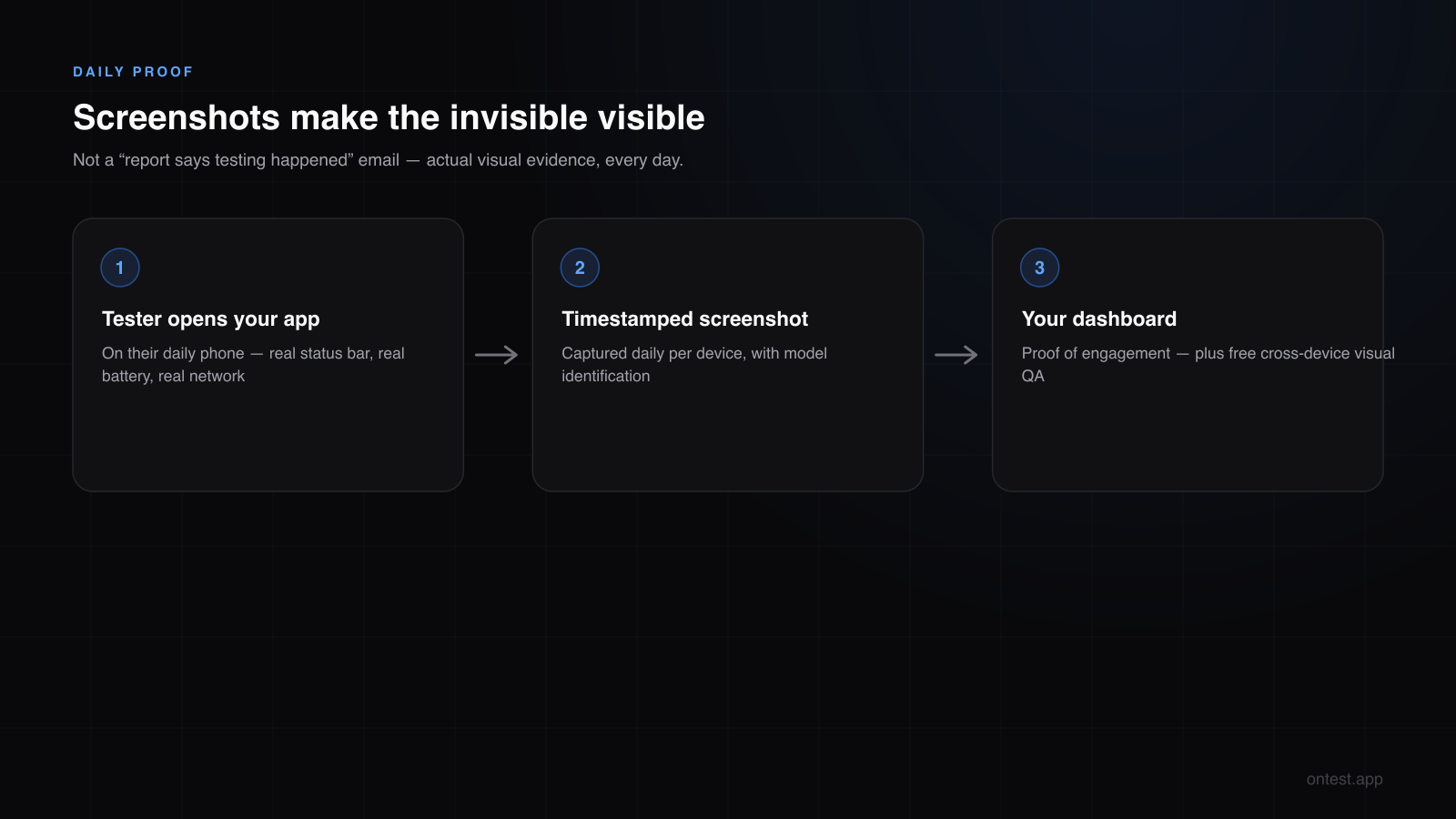
Every day during your 14-day test, you receive timestamped screenshots from each device showing your app running. Not a "report says testing happened" email. Actual visual proof.
What the screenshots show
- Your app on the actual device screen — you can see the device's status bar, navigation bar, and your app's UI rendered on that specific hardware
- Timestamp — when the screenshot was taken, so you can verify daily activity
- Device identification — which tester, which device model
Why this matters for three different audiences
For Google's algorithm: Screenshots themselves aren't submitted to Google. But the activity behind the screenshots — the daily app opens, the navigation to different screens, the real engagement — is exactly what Google's algorithm measures. The screenshots are your proof that the engagement data Google sees is genuine.
For your peace of mind: The number one anxiety during closed testing is "are my testers actually doing anything?" With most services, you pay and hope. With onTest, you open your dashboard and see visual proof every day. No guessing.
For your own QA: Screenshots from 12+ different devices running your app are free cross-device QA. You might spot a layout bug on Xiaomi MIUI that you never would have caught on your own Pixel. You might notice a dark mode issue on Samsung One UI. You get real visual data from real devices — use it.
What we've caught through screenshots
Real examples from customer apps:
- Keyboard overlap on Xiaomi — text input field was covered by MIUI's keyboard on Redmi Note 13 Pro but not on any Samsung or Pixel device
- Dark mode color conflict on Samsung — One UI's forced dark mode inverted a custom color that looked fine on stock Android
- Notch cutout overlap on Nothing Phone 2 — the camera hole punch was partially covered by a fixed header element
- RTL layout break — one tester's device was set to Arabic, exposing a right-to-left rendering bug the developer never considered
None of these would show up in an emulator. None of these would show up on a single-brand device pool. All of them showed up in daily screenshots.
The "Use It Every Day" Commitment
Here's the difference between onTest and services that just deliver email addresses:
Our testers commit to using your app every day for 14 days.
Not "install and forget." Not "open once on day 1." Every day, every device, real usage.
This is built into how the tester network operates:
- Testers are compensated for daily engagement, not just opt-in
- Dashboard tracking shows daily activity per device — if a tester goes quiet, we know and we act
- Replacement protocol — if a device drops off, a replacement device joins the test so your active count stays at or above your order
The result: your engagement graph over 14 days looks like this:
Day  1: ████████████ 12 active
Day  2: ████████████ 12 active
Day  3: ████████████ 12 active
Day  4: ████████████ 12 active
Day  5: ████████████ 12 active
Day  6: ████████████ 12 active
Day  7: ████████████ 12 active
Day  8: ████████████ 12 active
Day  9: ████████████ 12 active
Day 10: ████████████ 12 active
Day 11: ████████████ 12 active
Day 12: ████████████ 12 active
Day 13: ████████████ 12 active
Day 14: ████████████ 12 active
Not a spike-then-cliff. Not a U-shape. Consistent daily engagement across all 14 days. That's what Google's algorithm wants to see, and that's what real human testers who actually use your app produce.
Comparing the Approaches: Real Testers vs. The Alternatives
Let's put this in a table so you can see the differences at a glance:
| Factor | Fiverr / Cheap Service | Reddit Swaps | Emulator Farm | onTest |
|---|---|---|---|---|
| Real devices | Maybe | Yes | No | Yes — verified models |
| Daily engagement | Unlikely | Inconsistent | Scripted | Daily, 14 days |
| Device diversity | Unknown | Random | Identical | 5+ brands, Android 14+ |
| Screenshot proof | No | No | No | Daily, per device |
| Engagement pattern | Flat/dead | U-shaped | Robotic | Natural, consistent |
| Emulator detection risk | Medium | Low | High | Zero |
| Drop-off handling | You're stuck | Find replacement yourself | N/A | Auto-replacement |
| Your QA value | None | None | None | Cross-device visual QA |
| Price (12 testers) | $10-15 | Free + your time | Varies | $19.99 flat |
The few dollars between the cheapest option and onTest is the difference between "12 emails opted in and hope for the best" and "12 real humans on premium devices with daily screenshot proof."
If you've already been rejected once, you know which one is worth it.
What This Looks Like in Practice
Here's the actual flow when you order from onTest:
Hour 0: You place your order and provide your closed testing opt-in link.
Hours 1-4: Real testers opt in on their real devices. You see them appearing in your Play Console and on the onTest dashboard.
Day 1: All devices are active. First screenshots arrive in your dashboard. You can see your app running on a Galaxy S24, a Pixel 8, a Xiaomi Mi 14, a Nothing Phone 2 — all at once.
Days 2-13: Daily screenshots keep coming. Your dashboard shows active status across all devices. If you pushed an update, you see the new version reflected in the next day's screenshots. You spot a layout issue on one device and fix it — that's real QA happening during your closed test.
Day 14: All devices still active. Your Play Console shows 12+ opted-in testers for 14 consecutive days. The "Apply for production" button appears.
Day 15+: You submit the production access form. Google sees 14 days of consistent, diverse, genuine engagement data. You get approved.
No anxiety. No chasing swap partners. No wondering if your Fiverr testers actually exist.
The Bottom Line
Google Play's closed testing requirement isn't a bureaucratic checkbox. It's a quality signal. Google wants to see that real humans used your app on real devices for a real period of time.
Faking this doesn't work. Emulators get detected. Install-and-forget testers generate zero engagement. Single-brand device pools miss real bugs. U-shaped activity patterns signal forced behavior.
Real testing works. Human testers on premium devices, using your app daily for 14 days, generating organic engagement signals with screenshot proof of every session.
That's what onTest delivers. One flat package: 12 devices, 15 days, $19.99. Daily screenshots. Premium device diversity. Real humans, real phones, real engagement.
Frequently Asked Questions
Does Google really detect emulators during closed testing?
Yes. Google Play Services uses the Play Integrity API (formerly SafetyNet) to verify device authenticity. It checks hardware attestation, sensor data patterns, battery behavior, and architecture type. Emulators — even sophisticated ones — fail these checks over a 14-day period.
What engagement level does Google expect from testers during the 14 days?
Google hasn't published exact thresholds, but rejected apps consistently show one pattern: testers who installed the app but never or rarely opened it. Regular daily opens, varied session durations, and interaction with multiple app screens generate the engagement signal that gets approved.
How are onTest screenshots different from Firebase Test Lab screenshots?
Firebase Test Lab captures automated test screenshots on Google-hosted devices — useful for catching crashes, but not relevant to closed testing requirements. onTest screenshots come from real human testers on their personal devices during your actual 14-day closed test, proving genuine daily engagement.
What happens if a tester's device breaks or they can't continue?
onTest monitors daily activity for every device. If a tester drops off, a replacement device joins the test to maintain your active count. You're never left scrambling to find a replacement yourself.
Can I see which specific device model is running my app?
Yes. The onTest dashboard shows the exact model name, Android version, and active status for every device in your test. No "Android device" black boxes — full transparency.
Are daily screenshots stored somewhere I can access later?
Yes. All screenshots remain accessible in your onTest dashboard throughout your testing period and after. You can review them anytime to verify engagement or catch UI issues across different devices.
Is $19.99 worth it compared to free Reddit swap threads?
Reddit swaps are "free" in dollar terms but cost you 14 days of opening 12 strangers' apps daily, plus the risk of partners dropping out. Most developers who try swaps first end up spending 3-8 weeks before giving up and using a paid service. Your time has a price.
Does onTest work for apps that need more than 12 testers?
The package is sized to Google's requirement: exactly 12 devices, which is what the closed testing rule asks for. Since onTest replaces any device that drops off automatically, you don't need the safety buffer that DIY recruitment requires.
What if I already have some testers from friends or swaps?
Their feedback stays valuable, but Google's engagement bar is met by the package itself: 12 real devices active daily for the full window. You stop depending on friends' consistency for the requirement.
How quickly do testers start after I place an order?
Typically within 1-4 hours. You'll see testers appearing in both your Play Console and the onTest dashboard. The 14-day clock starts when testers opt in on Play Console.
Related guides
- Closed Testing Rejected? 5 Reasons Why — What the failure modes above look like from the rejection side, and how to recover.
- What Counts as an "Active" Tester? — The three engagement levels these signals measure.
- Google Play's 12 Testers 14 Days Requirement Explained — The rule these engagement signals enforce.
- How to Get 12 Testers: 7 Methods Compared — Recruitment channels ranked by engagement quality.
- Why onTest Is Different: One Honest Package, Premium Devices, Expert Review — The full comparison with bundle-based competitors.
- Google Play Production Access Questionnaire: The 10 Questions Answered (2026 Templates) — Copy-paste templates for the form Google asks after your 14 days.
- How Long Does Google Play Closed Testing Actually Take? (2026 Real Timeline) — The full timeline from setup to approval.
- My Friend's Two Android Apps, Three Months Lost, and Why We Built onTest — Why this service exists in the first place.
Questions? hello@ontest.app — I read every email personally.
Ready to ship your Android app?
Get 12 real testers for Google Play Closed Testing in 14 days.
Get Started